

RabbitMQ căn bản
- Published on
- /35 mins read/
Any sufficiently complex distributed system contains an ad-hoc, informally-specified, bug-ridden, slow implementation of half of a message queue. — Paraphrased from Greenspun's Tenth Rule
Tôi đã từng deploy một hệ thống microservices mà các service gọi nhau bằng REST synchronous. Mọi thứ chạy ngon lành cho đến khi traffic tăng gấp 10 lần vào Black Friday. Order Service gọi Inventory Service, Inventory gọi Payment, Payment gọi Notification... Một service chết, cả chuỗi domino sụp đổ. Latency p99 từ 200ms nhảy lên 15 giây. Đó là lúc tôi thực sự hiểu tại sao message queue tồn tại.
Bài viết này là tất cả những gì tôi ước mình biết sớm hơn về RabbitMQ — không phải tutorial "Hello World", mà là deep dive thực sự từ kiến trúc bên trong cho đến production patterns với Java và Spring Boot.
# Message Queue là gì
Hãy tưởng tượng bạn đang ở một nhà hàng đông đúc.
Không có message queue = Khách hàng đứng trước bếp, chờ đầu bếp nấu xong mới order tiếp. Một món phức tạp → cả hàng đứng chờ.
Có message queue = Khách hàng viết order lên giấy, đặt vào kệ. Đầu bếp lấy order từ kệ theo thứ tự. Khách hàng tự do ngồi xuống. Nhiều đầu bếp có thể lấy order song song.
Cái "kệ order" đó chính là message queue.
# vấn đề thực tế mà Message Queue giải quyết
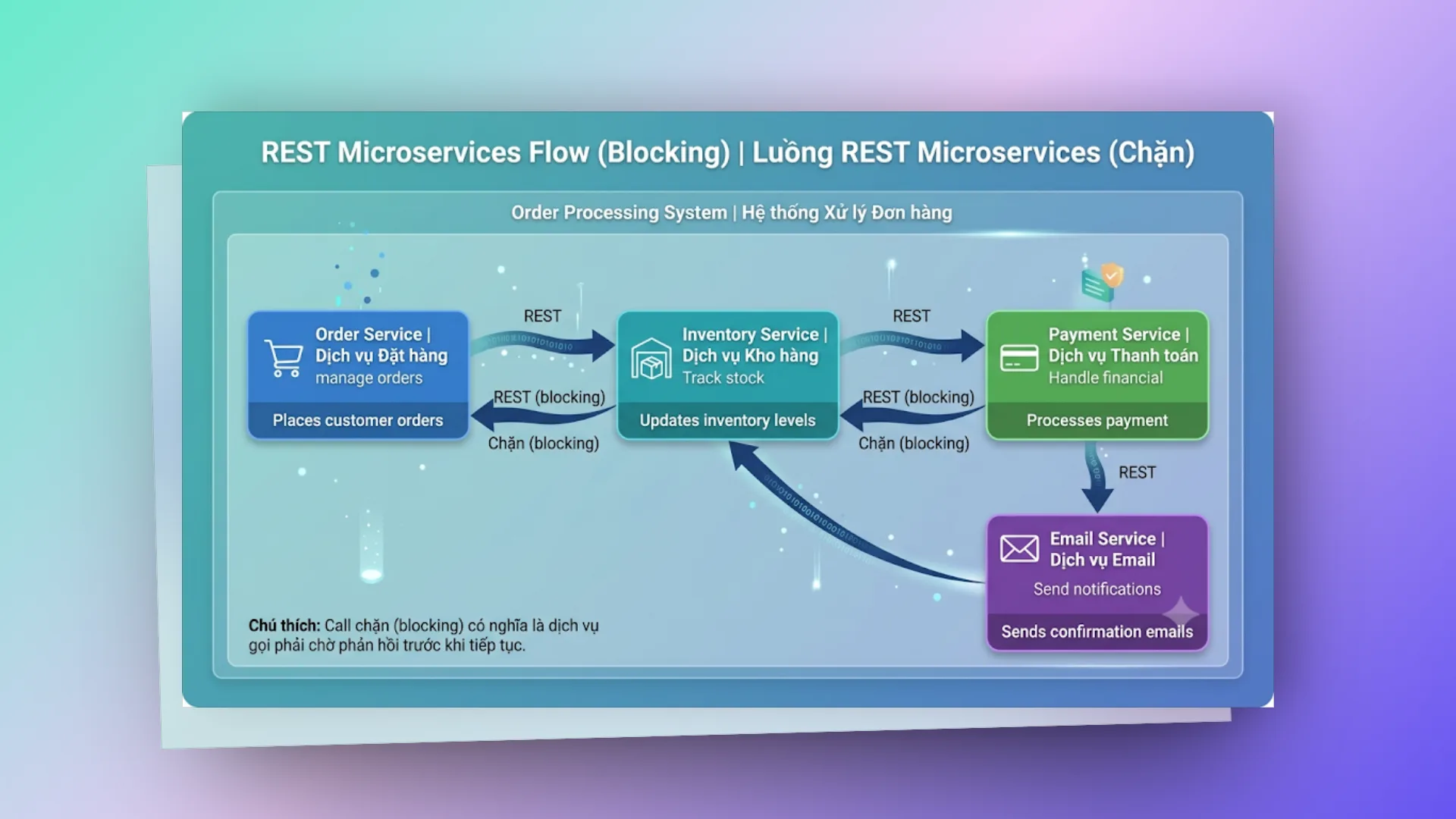
Vấn đề:
- Temporal coupling: Tất cả service phải online cùng lúc
- Latency chồng chất: 100ms + 100ms + 100ms + 100ms = 400ms minimum
- Cascading failure: Payment chết → Inventory timeout → Order fail
- Không scale được: Peak traffic = tất cả service phải scale cùng lúc
Với message queue:
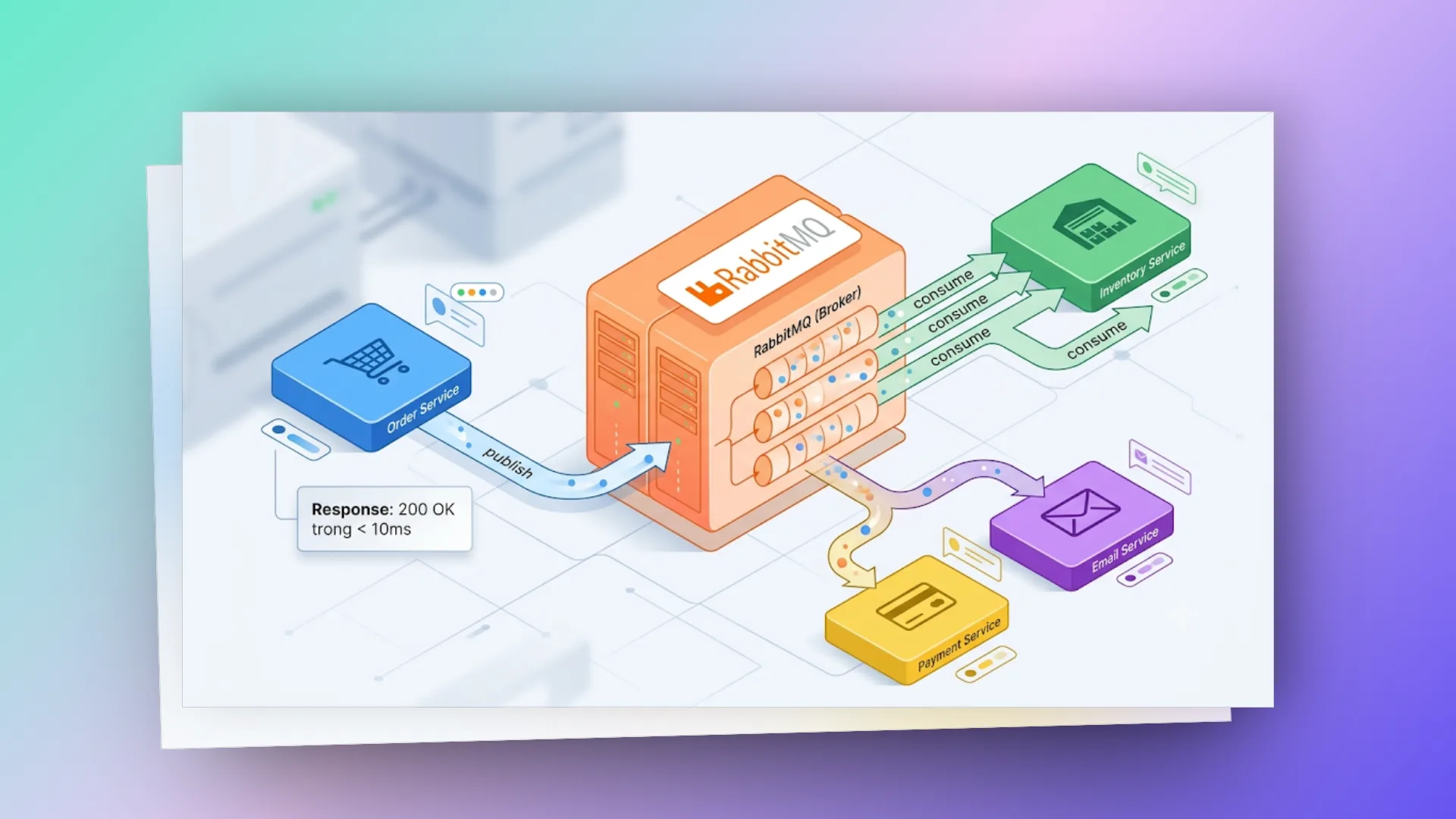
Lợi ích:
- Decoupling: Order Service không cần biết ai consume
- Async: Response ngay lập tức, xử lý background
- Buffer: Traffic spike? Message queue giữ lại, consumer xử lý dần
- Resilience: Service chết? Message vẫn nằm trong queue, xử lý khi service sống lại
# lý do cốt lõi để áp dụng message queue
- Decoupling (Giảm độ liên kết): Hệ thống gửi tin (Producer) không cần quan tâm hệ thống nhận (Consumer) là ai, ở đâu, hay đang viết bằng ngôn ngữ gì. Bạn có thể thêm bớt Consumer thoải mái mà không cần động vào code của Producer.
- Buffering (Đệm & giảm tải): Khi lượng request đổ về quá nhanh vượt quá khả năng xử lý của Consumer, Queue đóng vai trò như một bộ đệm hấp thụ lực. Thay vì Consumer bị sập do quá tải (overwhelm), nó cứ thong thả lấy message ra xử lý theo đúng năng lực của mình.
- Resilience (Khả năng phục hồi): Lỡ Consumer có đột ngột lăn ra chết? Không vấn đề gì cả. Message vẫn nằm an toàn trong Queue. Khi Consumer sống lại, nó sẽ tiếp tục xử lý từ đúng vị trí bị gián đoạn.
# RabbitMQ — Bức tranh toàn cảnh
# RabbitMQ là gì?
RabbitMQ là một open-source message broker implement AMQP (Advanced Message Queuing Protocol). Được viết bằng Erlang — một ngôn ngữ được thiết kế cho hệ thống telecom với yêu cầu uptime 99.999% (five nines).
Tại sao lại là Erlang? Ngôn ngữ này sở hữu những đặc tính cực kỳ phù hợp cho Message Broker:
- Hỗ trợ hàng triệu process siêu nhẹ (lightweight processes) chạy đồng thời.
- Cơ chế Hot code swapping (update code hệ thống trực tiếp mà không cần reboot).
- Hỗ trợ tính toán phân tán (distributed computing) ngay từ lõi.
- Khả năng chịu lỗi (fault tolerance) cực tốt nhờ mô hình Supervisor Trees.
Nhờ nền tảng Erlang vững chắc này, RabbitMQ có thể xử lý hàng trăm nghìn message mỗi giây với độ trễ (latency) cực kỳ thấp.
# lịch sử phát triển
- 2007: Rabbit Technologies Ltd chính thức ra mắt RabbitMQ.
- 2010: VMware mua lại Rabbit Technologies.
- 2013: Dự án được chuyển giao cho Pivotal Software (một nhánh tách ra từ VMware).
- 2019: VMware mua lại Pivotal, đưa RabbitMQ trở lại mái nhà xưa.
- Hiện tại: Thuộc sở hữu của Broadcom (sau thương vụ thâu tóm VMware) nhưng vẫn giữ định hướng open-source với cộng đồng cực kỳ lớn mạnh.
# những ông lớn nào đang dùng rabbitmq?
- Bloomberg: Xử lý hàng triệu message tài chính mỗi giây với yêu cầu độ tin cậy tuyệt đối.
- Reddit: Vận hành hệ thống push notification quy mô lớn.
- Mozilla: Quản lý dịch vụ push notification trên trình duyệt Firefox.
- Zalando: Trái tim của pipeline xử lý đơn hàng thương mại điện tử.
- Và rất nhiều startup đến enterprise khác...
# kiến trúc bên trong rabbitmq
Nếu nắm chắc phần này, các vấn đề cấu hình hay debug sau này sẽ dễ thở hơn rất nhiều.
# các thành phần cốt lõi
# các thành phần
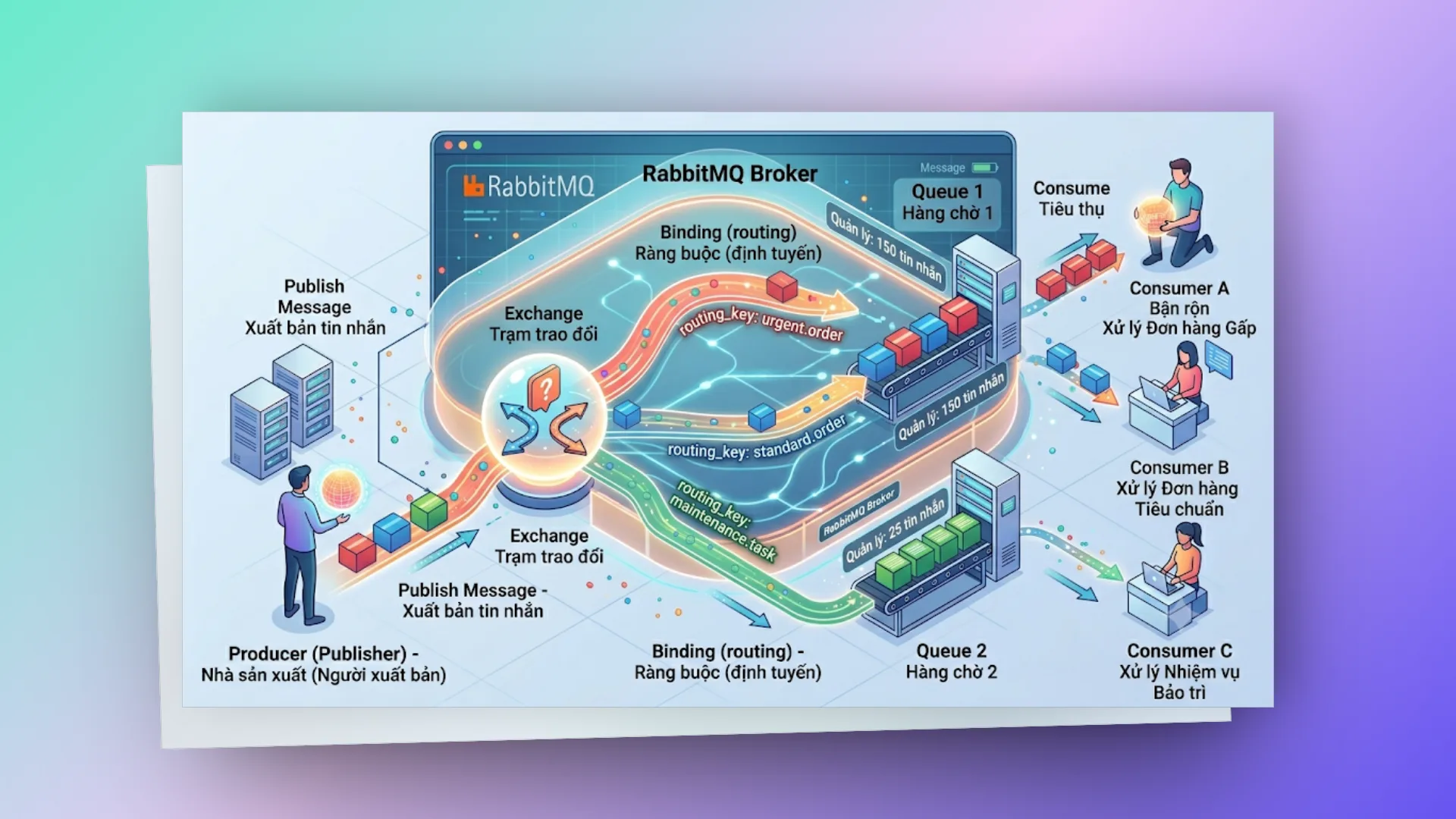
Producer (Publisher) Ứng dụng gửi message. Cần lưu ý là Producer không gửi tin nhắn trực tiếp vào Queue — nó bắt buộc phải gửi thông qua một thành phần trung gian gọi là Exchange. Đây là điểm khác biệt quan trọng của RabbitMQ so với nhiều message queue khác.
Exchange Được ví như bộ não định tuyến. Nó nhận message từ Producer và quyết định sẽ chuyển tiếp tin nhắn đó vào Queue nào dựa trên:
- Exchange Type (loại exchange: direct, topic, fanout, headers).
- Routing Key (nhãn đính kèm trên message).
- Binding Rules (quy tắc liên kết giữa Exchange và Queue).
Hãy tưởng tượng Exchange như một bưu điện: nó nhìn vào địa chỉ trên phong bì (routing key) để phân phối thư vào đúng hòm thư (queue).
Binding Là luật liên kết giữa Exchange và Queue. Một binding sẽ định nghĩa: "Hãy chuyển các message có routing key X này vào queue Y".
Queue Nơi lưu trữ message cho đến khi có Consumer lấy đi xử lý. Một Queue có các thuộc tính quan trọng:
- Durable: Đảm bảo an toàn dữ liệu. Message sẽ được ghi xuống ổ đĩa để không bị mất khi RabbitMQ broker khởi động lại.
- Exclusive: Chỉ cho phép kết nối hiện tại sử dụng và tự động xóa khi kết nối này đóng lại.
- Auto-delete: Tự động biến mất khi Consumer cuối cùng ngắt kết nối (unsubscribe).
- TTL (Time-To-Live): Đặt thời gian sống cho message, quá thời hạn này message sẽ tự động bị hủy.
Consumer Ứng dụng kết nối tới Queue để nhận và xử lý message. Có hai cơ chế nhận tin nhắn:
- Push (Basic.Consume): Broker chủ động đẩy message xuống cho Consumer khi có tin mới — đây là cơ chế phổ biến nhất nhờ hiệu năng cao.
- Pull (Basic.Get): Consumer chủ động kéo message về — ít khi dùng vì tốn tài nguyên và độ trễ cao.
# connection & channel
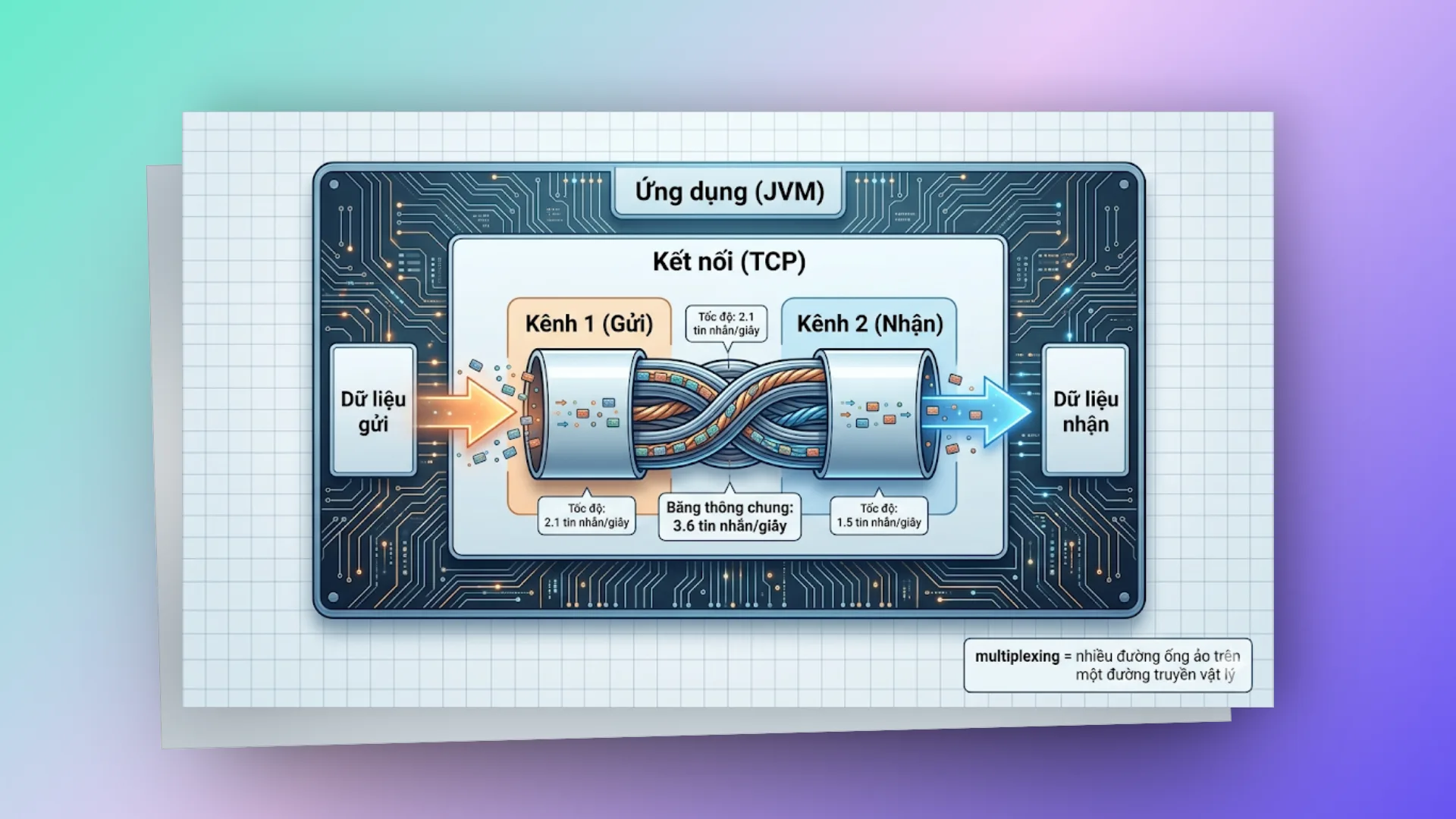
Connection: Là một kết nối vật lý (TCP connection) từ ứng dụng tới RabbitMQ broker. Việc mở mới một Connection rất tốn tài nguyên (phải thực hiện bắt tay TCP, xác thực, bắt tay bảo mật TLS...). Do đó, ta nên giữ kết nối này bền vững thay vì tạo mới liên tục.
Channel: Là một kết nối ảo (virtual connection) chạy trên một Connection vật lý. Tạo và đóng Channel cực kỳ nhanh và tốn rất ít tài nguyên. Mỗi luồng (thread) xử lý trong code của bạn nên sử dụng một Channel riêng.
Kinh nghiệm thực tế: Mỗi ứng dụng chỉ nên duy trì một Connection duy nhất, và tạo ra một Channel cho mỗi thread xử lý. Tuyệt đối không chia sẻ (share) Channel giữa các thread vì nó không được thiết kế để thread-safe.
# virtual host (vhost)
Có vai trò tương tự như database schema hay namespace giúp phân vùng tài nguyên. Mỗi vhost sở hữu các Exchange, Queue, và Binding hoàn toàn độc lập. Chúng ta thường dùng vhost để cô lập các môi trường (dev, staging, prod) hoặc phân tách quyền truy cập giữa các team/dự án khác nhau trên cùng một cụm RabbitMQ Cluster.
RabbitMQ Broker
├── vhost: /production
│   ├── exchange: order.exchange
│   ├── queue: order.processing
│   └── queue: order.notification
├── vhost: /staging
│   ├── exchange: order.exchange
│   └── queue: order.processing
└── vhost: /development
    └── ...
# amqp protocol
AMQP (Advanced Message Queuing Protocol) là giao thức truyền tin ở tầng mạng (wire-level) mà RabbitMQ đang sử dụng. Nắm được cách thức hoạt động của giao thức này sẽ giúp bạn dễ dàng debug và tối ưu hóa hệ thống khi gặp sự cố.
# vòng đời của một message
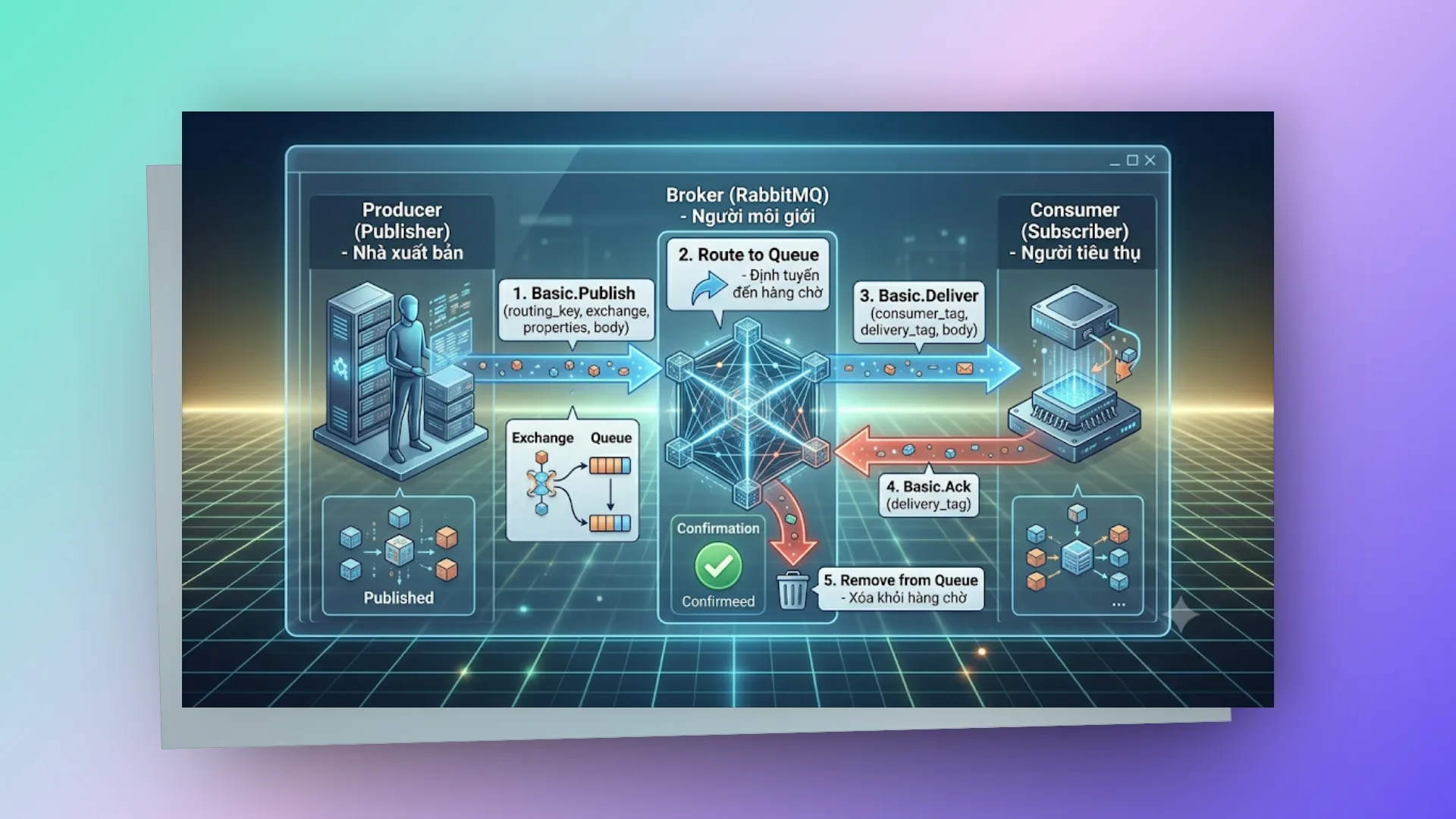
# message properties (thuộc tính tin nhắn)
Mỗi message AMQP được chia làm hai phần: properties (metadata cấu hình) và body (nội dung payload chứa dữ liệu thực tế).
// Các properties quan trọng thường dùng:
MessageProperties properties = MessagePropertiesBuilder.newInstance()
    .setContentType("application/json")       // Định dạng dữ liệu của body
    .setContentEncoding("UTF-8")              // Bảng mã hóa ký tự
    .setDeliveryMode(MessageDeliveryMode.PERSISTENT) // 1=tạm thời, 2=lưu đĩa (survive restart)
    .setPriority(5)                           // Độ ưu tiên của tin nhắn từ 0-9
    .setCorrelationId("abc-123")              // Dùng để định danh request-response (RPC)
    .setReplyTo("response.queue")             // Queue nhận phản hồi
    .setExpiration("60000")                   // TTL thời gian hết hạn (milliseconds)
    .setMessageId(UUID.randomUUID().toString()) // ID duy nhất chống lặp tin
    .setTimestamp(new Date())                 // Thời gian tạo tin nhắn
    .setType("OrderCreatedEvent")             // Tên loại sự kiện
    .setAppId("order-service")                // ID ứng dụng gửi tin
    .build();
# acknowledgment — cơ chế xác nhận tin nhắn
Đây là phần cực kỳ dễ bị bỏ sót nhưng lại là tác nhân gây ra hàng loạt bug nghiêm trọng trên môi trường Production.
Auto Ack (autoAck=true):
- Message sẽ bị xóa khỏi Queue ngay khi vừa được gửi đến Consumer.
- Lỡ Consumer sập (crash) khi đang xử lý giữa chừng? Tin nhắn đó coi như mất vĩnh viễn.
- Chỉ nên dùng cho những message không quá quan trọng như log hoặc metrics.
Manual Ack (autoAck=false):
- Consumer bắt buộc phải chủ động gửi tín hiệu xác nhận (ack) về cho broker sau khi đã xử lý xong tin nhắn.
- Nếu Consumer gặp sự cố trước khi kịp gửi ack, RabbitMQ sẽ tự động đẩy tin nhắn đó quay lại queue để Consumer khác (hoặc chính nó sau khi khởi động lại) xử lý tiếp.
- Đây là cấu hình mặc định bắt buộc phải dùng cho môi trường Production.
// Ba loại xác nhận cơ bản:
channel.basicAck(deliveryTag, false);   // Xử lý thành công, cho phép xóa tin nhắn khỏi queue
channel.basicNack(deliveryTag, false, true);  // Thất bại, yêu cầu đẩy lại vào queue (requeue) để thử lại
channel.basicReject(deliveryTag, false);      // Thất bại, loại bỏ tin nhắn (hoặc chuyển sang DLX) không requeue
Cảnh báo (Gotcha): Quên gửi ack là một trong những nguyên nhân phổ biến nhất dẫn đến memory leak trên RabbitMQ. Message sẽ bị treo ở trạng thái "Unacked" vô thời hạn, khiến Broker giữ lại trong RAM và không thể giải phóng bộ nhớ. Trước đây mình từng tốn cả buổi chiều chỉ để debug lỗi ngớ ngẩn này.
# exchange types — bộ não định tuyến
Đây có lẽ là tính năng linh hoạt và thú vị nhất của RabbitMQ khi so sánh với các message queue khác. Chúng ta có 4 loại Exchange chính tương ứng với các bài toán định tuyến khác nhau:
# direct exchange
Định tuyến chính xác dựa theo Routing Key. Message chỉ được chuyển đến Queue có Binding Key khớp hoàn toàn (exact match) với Routing Key của tin nhắn.
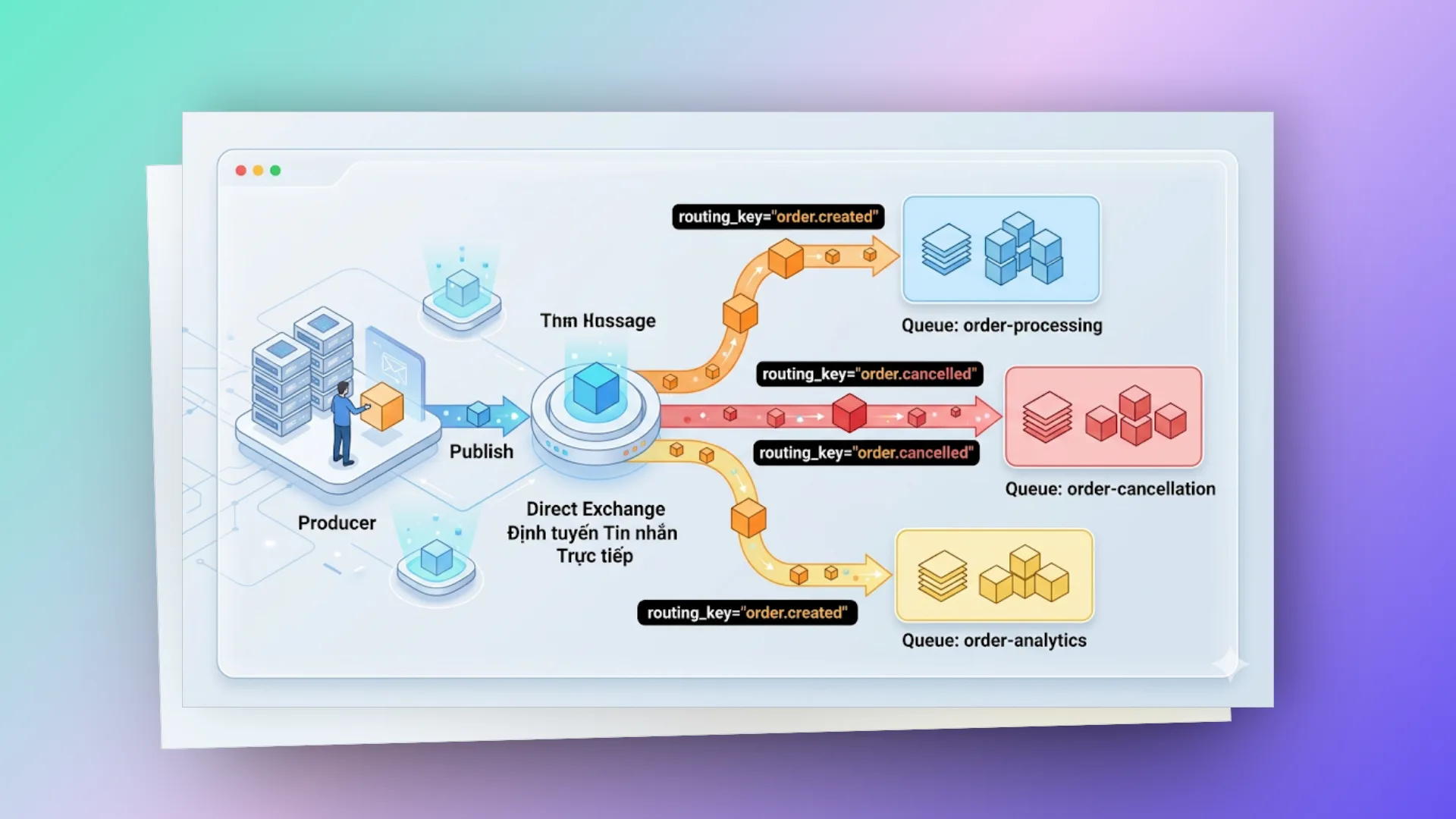
Use case: Phân phối tác vụ (task distribution), điều hướng tin nhắn đến đúng các service chuyên biệt.
// Khai báo
channel.exchangeDeclare("order.direct", BuiltinExchangeType.DIRECT, true);
channel.queueDeclare("order-processing", true, false, false, null);
channel.queueBind("order-processing", "order.direct", "order.created");

// Gửi tin nhắn
channel.basicPublish("order.direct", "order.created", null, message.getBytes());
# fanout exchange
Cơ chế Broadcast — gửi message tới tất cả các Queue đang liên kết với nó mà không cần quan tâm đến Routing Key.
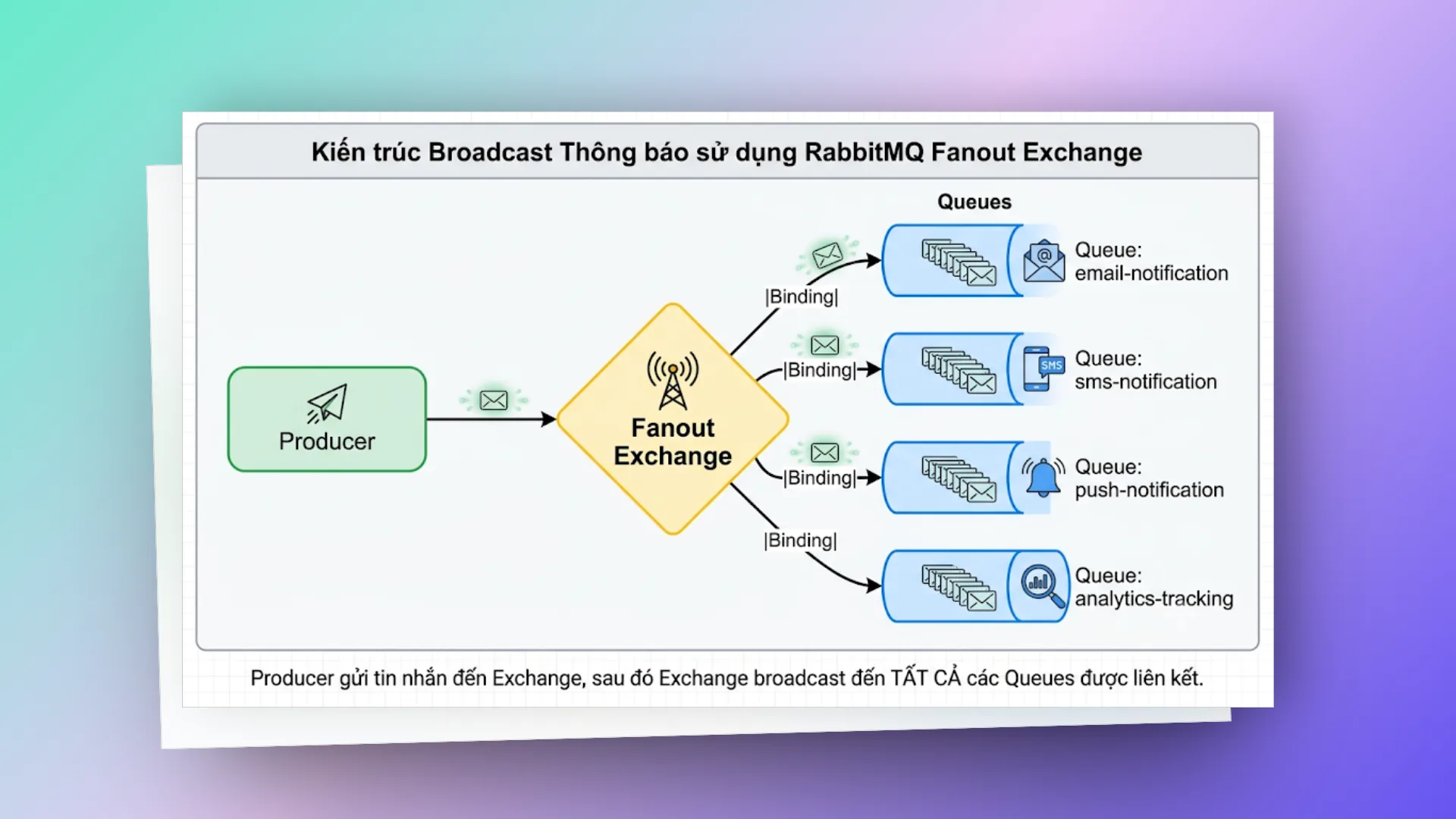
Use case: Phát tán sự kiện (event broadcasting), gửi các thông báo cho nhiều service chạy bất đồng bộ cùng lúc.
// Khai báo
channel.exchangeDeclare("notification.fanout", BuiltinExchangeType.FANOUT, true);
channel.queueBind("email-queue", "notification.fanout", ""); // routing key bị bỏ qua

// Publish — routing key đặt trống
channel.basicPublish("notification.fanout", "", null, message.getBytes());
# topic exchange
Định tuyến linh hoạt thông qua khớp mẫu (pattern matching) với Routing Key bằng các ký tự đại diện (wildcard). Các từ trong Routing Key phân tách với nhau bằng dấu chấm (.), kết hợp với:
- Ký tự
*(star): Thay thế cho đúng 1 từ. - Ký tự
#(hash): Thay thế cho 0 hoặc nhiều từ.
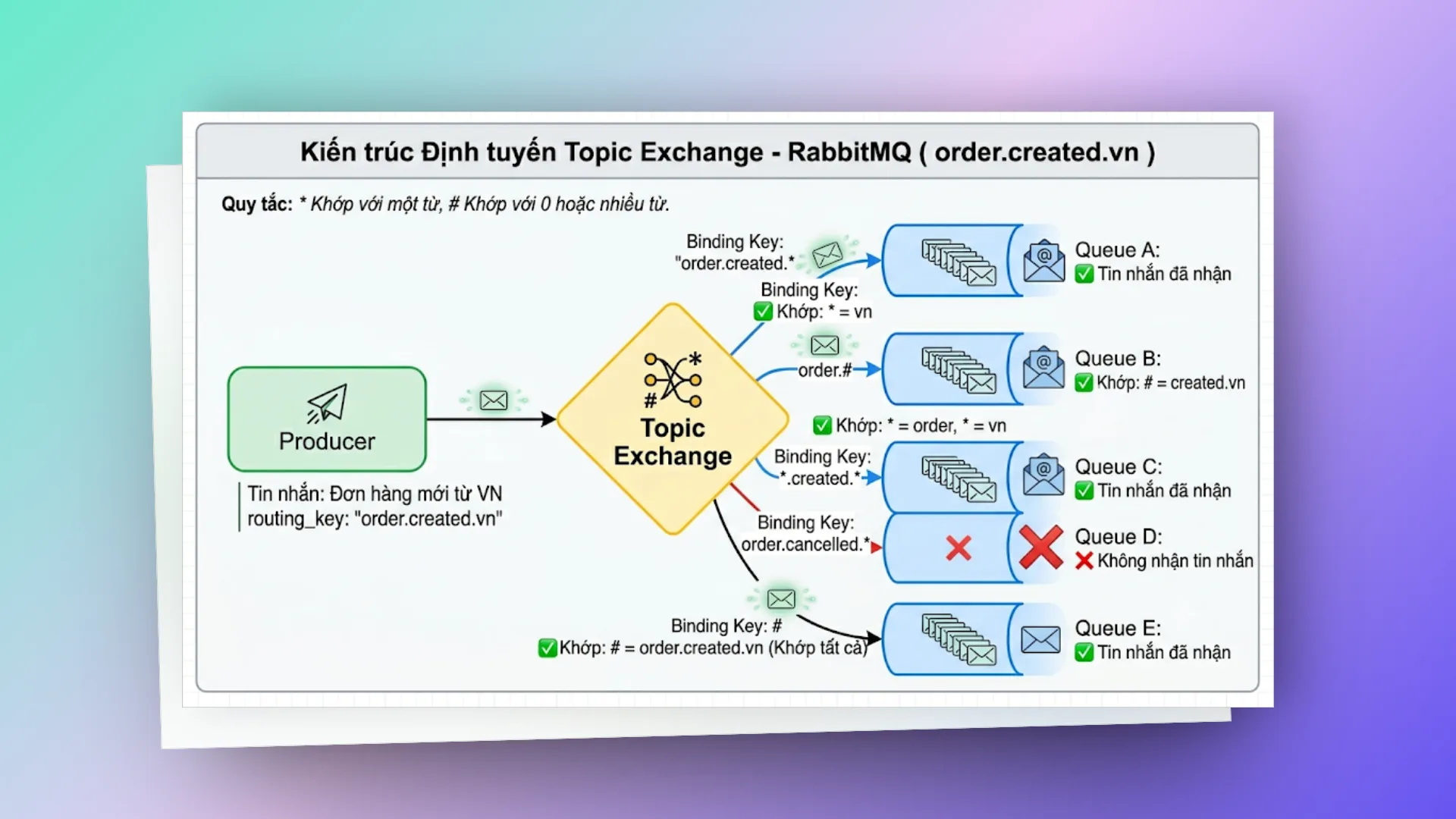
Use case: Định tuyến tin nhắn linh hoạt dựa trên nhiều tiêu chí lọc nâng cao.
// Khai báo
channel.exchangeDeclare("events.topic", BuiltinExchangeType.TOPIC, true);
channel.queueBind("vn-orders", "events.topic", "order.*.vn");
channel.queueBind("all-orders", "events.topic", "order.#");
channel.queueBind("all-events", "events.topic", "#");

// Publish
channel.basicPublish("events.topic", "order.created.vn", null, message.getBytes());
# headers exchange
Định tuyến dựa trên thông tin trong thuộc tính Headers của message thay vị Routing Key. Loại này ít khi được dùng vì hiệu năng kém nhất, nhưng lại cực kỳ mạnh mẽ khi cần filter phức tạp.
// Liên kết queue kèm điều kiện match header
Map<String, Object> headers = new HashMap<>();
headers.put("x-match", "all");  // "all" = tất cả điều kiện phải đúng (AND), "any" = chỉ cần 1 điều kiện (OR)
headers.put("format", "pdf");
headers.put("type", "report");
channel.queueBind("pdf-reports", "docs.headers", "", headers);

// Publish tin nhắn kèm header tương ứng
AMQP.BasicProperties props = new AMQP.BasicProperties.Builder()
    .headers(Map.of("format", "pdf", "type", "report"))
    .build();
channel.basicPublish("docs.headers", "", props, message.getBytes());
# so sánh nhanh
| Exchange | Cơ chế định tuyến | Tốc độ xử lý | Use Case thực tế |
|---|---|---|---|
| Direct | Khớp chính xác | Nhanh nhất | Điểm - Điểm, hàng đợi tác vụ |
| Fanout | Gửi hàng loạt | Rất nhanh | Phát tán sự kiện (Pub/Sub) |
| Topic | Khớp theo mẫu | Nhanh | Định tuyến linh hoạt, lọc sự kiện |
| Headers | Khớp theo Header | Chậm nhất | Bộ lọc định tuyến phức tạp |
Kinh nghiệm thực tế: 90% các bài toán hàng ngày của bạn chỉ cần dùng Direct và Topic Exchange là đủ. Fanout hữu ích khi cần broadcast (ví dụ gửi notification). Còn Headers Exchange thì hầu như rất hiếm khi sờ tới.
# spring boot + rabbitmq!
Để dễ hình dung hơn, chúng ta sẽ cùng nhau xây dựng một hệ thống xử lý đơn hàng (Order Processing) hoàn chỉnh để thấy cách RabbitMQ hoạt động trong thực tế thế nào.
# setup dự án
pom.xml — Khai báo các dependency cần thiết:
<dependencies>
    <!-- Spring Boot Starter -->
    <dependency>
        <groupId>org.springframework.boot</groupId>
        <artifactId>spring-boot-starter-web</artifactId>
    </dependency>

    <!-- Spring AMQP — RabbitMQ integration -->
    <dependency>
        <groupId>org.springframework.boot</groupId>
        <artifactId>spring-boot-starter-amqp</artifactId>
    </dependency>

    <!-- JSON serialization -->
    <dependency>
        <groupId>com.fasterxml.jackson.core</groupId>
        <artifactId>jackson-databind</artifactId>
    </dependency>

    <!-- Lombok — giảm boilerplate -->
    <dependency>
        <groupId>org.projectlombok</groupId>
        <artifactId>lombok</artifactId>
        <optional>true</optional>
    </dependency>
</dependencies>
application.yml — Cấu hình kết nối:
spring:
  rabbitmq:
    host: localhost
    port: 5672
    username: guest
    password: guest
    virtual-host: /
    # Connection pooling
    connection-timeout: 5000
    # Listener configuration
    listener:
      simple:
        acknowledge-mode: manual # QUAN TRỌNG: Manual ack cho production
        prefetch: 10 # Số message consumer nhận trước khi ack
        concurrency: 3 # Min consumer threads
        max-concurrency: 10 # Max consumer threads
        retry:
          enabled: true
          initial-interval: 1000 # 1 giây
          max-interval: 10000 # 10 giây
          multiplier: 2.0 # Exponential backoff
          max-attempts: 3
    # Publisher confirms
    publisher-confirm-type: correlated # Async publisher confirms
    publisher-returns: true # Return unroutable messages
# rabbitmq config
package com.example.order.config;

import org.springframework.amqp.core.*;
import org.springframework.amqp.rabbit.config.SimpleRabbitListenerContainerFactory;
import org.springframework.amqp.rabbit.connection.ConnectionFactory;
import org.springframework.amqp.rabbit.core.RabbitTemplate;
import org.springframework.amqp.support.converter.Jackson2JsonMessageConverter;
import org.springframework.amqp.support.converter.MessageConverter;
import org.springframework.context.annotation.Bean;
import org.springframework.context.annotation.Configuration;

@Configuration
public class RabbitMQConfig {

    // ==================== Constants ====================
    public static final String ORDER_EXCHANGE = "order.exchange";
    public static final String ORDER_QUEUE = "order.processing.queue";
    public static final String ORDER_ROUTING_KEY = "order.created";

    public static final String NOTIFICATION_EXCHANGE = "notification.exchange";
    public static final String EMAIL_QUEUE = "notification.email.queue";
    public static final String SMS_QUEUE = "notification.sms.queue";

    // Dead Letter
    public static final String DLX_EXCHANGE = "dlx.exchange";
    public static final String DLX_QUEUE = "dlx.queue";
    public static final String DLX_ROUTING_KEY = "dlx.routing";

    // ==================== Exchanges ====================

    @Bean
    public TopicExchange orderExchange() {
        return ExchangeBuilder
                .topicExchange(ORDER_EXCHANGE)
                .durable(true)
                .build();
    }

    @Bean
    public FanoutExchange notificationExchange() {
        return ExchangeBuilder
                .fanoutExchange(NOTIFICATION_EXCHANGE)
                .durable(true)
                .build();
    }

    @Bean
    public DirectExchange deadLetterExchange() {
        return ExchangeBuilder
                .directExchange(DLX_EXCHANGE)
                .durable(true)
                .build();
    }

    // ==================== Queues ====================

    @Bean
    public Queue orderQueue() {
        return QueueBuilder
                .durable(ORDER_QUEUE)
                .withArgument("x-dead-letter-exchange", DLX_EXCHANGE)
                .withArgument("x-dead-letter-routing-key", DLX_ROUTING_KEY)
                .withArgument("x-message-ttl", 300000) // 5 phút TTL
                .build();
    }

    @Bean
    public Queue emailQueue() {
        return QueueBuilder
                .durable(EMAIL_QUEUE)
                .withArgument("x-dead-letter-exchange", DLX_EXCHANGE)
                .withArgument("x-dead-letter-routing-key", DLX_ROUTING_KEY)
                .build();
    }

    @Bean
    public Queue smsQueue() {
        return QueueBuilder
                .durable(SMS_QUEUE)
                .withArgument("x-dead-letter-exchange", DLX_EXCHANGE)
                .withArgument("x-dead-letter-routing-key", DLX_ROUTING_KEY)
                .build();
    }

    @Bean
    public Queue deadLetterQueue() {
        return QueueBuilder
                .durable(DLX_QUEUE)
                .build();
    }

    // ==================== Bindings ====================

    @Bean
    public Binding orderBinding() {
        return BindingBuilder
                .bind(orderQueue())
                .to(orderExchange())
                .with("order.#"); // Match tất cả order events
    }

    @Bean
    public Binding emailBinding() {
        return BindingBuilder
                .bind(emailQueue())
                .to(notificationExchange());
    }

    @Bean
    public Binding smsBinding() {
        return BindingBuilder
                .bind(smsQueue())
                .to(notificationExchange());
    }

    @Bean
    public Binding deadLetterBinding() {
        return BindingBuilder
                .bind(deadLetterQueue())
                .to(deadLetterExchange())
                .with(DLX_ROUTING_KEY);
    }

    // ==================== Message Converter ====================

    @Bean
    public MessageConverter jsonMessageConverter() {
        return new Jackson2JsonMessageConverter();
    }

    // ==================== RabbitTemplate ====================

    @Bean
    public RabbitTemplate rabbitTemplate(ConnectionFactory connectionFactory) {
        RabbitTemplate template = new RabbitTemplate(connectionFactory);
        template.setMessageConverter(jsonMessageConverter());

        // Publisher Confirms — biết chắc message đã đến Exchange
        template.setConfirmCallback((correlationData, ack, cause) -> {
            if (ack) {
                log.debug("Message delivered to exchange: {}", correlationData);
            } else {
                log.error("Message FAILED to deliver to exchange: {}, cause: {}",
                        correlationData, cause);
                // TODO: Retry logic hoặc save to DB
            }
        });

        // Publisher Returns — message không route được đến queue nào
        template.setReturnsCallback(returned -> {
            log.error("Message returned: exchange={}, routingKey={}, replyCode={}, replyText={}",
                    returned.getExchange(),
                    returned.getRoutingKey(),
                    returned.getReplyCode(),
                    returned.getReplyText());
        });

        template.setMandatory(true); // Enable returns cho unroutable messages
        return template;
    }

    // ==================== Listener Container Factory ====================

    @Bean
    public SimpleRabbitListenerContainerFactory rabbitListenerContainerFactory(
            ConnectionFactory connectionFactory) {
        SimpleRabbitListenerContainerFactory factory = new SimpleRabbitListenerContainerFactory();
        factory.setConnectionFactory(connectionFactory);
        factory.setMessageConverter(jsonMessageConverter());
        factory.setAcknowledgeMode(AcknowledgeMode.MANUAL);
        factory.setPrefetchCount(10);
        factory.setConcurrentConsumers(3);
        factory.setMaxConcurrentConsumers(10);
        return factory;
    }
}
# domain models
package com.example.order.model;

import lombok.AllArgsConstructor;
import lombok.Builder;
import lombok.Data;
import lombok.NoArgsConstructor;
import java.io.Serializable;
import java.math.BigDecimal;
import java.time.LocalDateTime;
import java.util.List;

@Data
@Builder
@NoArgsConstructor
@AllArgsConstructor
public class OrderEvent implements Serializable {

    private String orderId;
    private String customerId;
    private String customerEmail;
    private String customerPhone;
    private List<OrderItem> items;
    private BigDecimal totalAmount;
    private String currency;
    private OrderStatus status;
    private LocalDateTime createdAt;
    private String eventType; // "created", "paid", "shipped", "cancelled"

    @Data
    @Builder
    @NoArgsConstructor
    @AllArgsConstructor
    public static class OrderItem implements Serializable {
        private String productId;
        private String productName;
        private int quantity;
        private BigDecimal price;
    }

    public enum OrderStatus {
        PENDING, CONFIRMED, PAID, SHIPPED, DELIVERED, CANCELLED
    }
}
# producer — gửi message
package com.example.order.producer;

import com.example.order.config.RabbitMQConfig;
import com.example.order.model.OrderEvent;
import lombok.RequiredArgsConstructor;
import lombok.extern.slf4j.Slf4j;
import org.springframework.amqp.rabbit.connection.CorrelationData;
import org.springframework.amqp.rabbit.core.RabbitTemplate;
import org.springframework.stereotype.Service;

import java.util.UUID;

@Slf4j
@Service
@RequiredArgsConstructor
public class OrderProducer {

    private final RabbitTemplate rabbitTemplate;

    /**
     * Publish order event đến Topic Exchange.
     * Routing key format: order.{eventType}
     * Ví dụ: order.created, order.paid, order.shipped
     */
    public void publishOrderEvent(OrderEvent event) {
        String routingKey = "order." + event.getEventType();
        String correlationId = UUID.randomUUID().toString();

        log.info("Publishing order event: orderId={}, type={}, correlationId={}",
                event.getOrderId(), event.getEventType(), correlationId);

        CorrelationData correlationData = new CorrelationData(correlationId);

        rabbitTemplate.convertAndSend(
                RabbitMQConfig.ORDER_EXCHANGE,
                routingKey,
                event,
                message -> {
                    // Custom message properties
                    message.getMessageProperties().setMessageId(UUID.randomUUID().toString());
                    message.getMessageProperties().setCorrelationId(correlationId);
                    message.getMessageProperties().setHeader("source", "order-service");
                    message.getMessageProperties().setHeader("version", "1.0");
                    return message;
                },
                correlationData
        );

        log.info("Order event published successfully: orderId={}", event.getOrderId());
    }

    /**
     * Broadcast notification đến tất cả notification consumers.
     * Dùng Fanout Exchange — tất cả queue bound sẽ nhận message.
     */
    public void broadcastNotification(OrderEvent event) {
        log.info("Broadcasting notification for order: {}", event.getOrderId());

        rabbitTemplate.convertAndSend(
                RabbitMQConfig.NOTIFICATION_EXCHANGE,
                "", // Fanout exchange bỏ qua routing key
                event
        );
    }
}
# consumer — nhận và xử lý message
package com.example.order.consumer;

import com.example.order.model.OrderEvent;
import com.rabbitmq.client.Channel;
import lombok.extern.slf4j.Slf4j;
import org.springframework.amqp.rabbit.annotation.RabbitListener;
import org.springframework.amqp.support.AmqpHeaders;
import org.springframework.messaging.handler.annotation.Header;
import org.springframework.messaging.handler.annotation.Payload;
import org.springframework.stereotype.Component;

import java.io.IOException;

@Slf4j
@Component
public class OrderConsumer {

    /**
     * Consumer chính xử lý order events.
     *
     * Manual Ack pattern:
     * 1. Nhận message
     * 2. Xử lý business logic
     * 3. Ack nếu thành công, Nack nếu thất bại
     *
     * QUAN TRỌNG: Luôn ack/nack trong finally block để tránh message bị stuck
     */
    @RabbitListener(
            queues = "order.processing.queue",
            containerFactory = "rabbitListenerContainerFactory"
    )
    public void handleOrderEvent(
            @Payload OrderEvent event,
            @Header(AmqpHeaders.DELIVERY_TAG) long deliveryTag,
            @Header(AmqpHeaders.REDELIVERED) boolean redelivered,
            Channel channel) throws IOException {

        log.info("Received order event: orderId={}, type={}, redelivered={}",
                event.getOrderId(), event.getEventType(), redelivered);

        try {
            // ========== Business Logic ==========
            switch (event.getEventType()) {
                case "created":
                    processNewOrder(event);
                    break;
                case "paid":
                    processPayment(event);
                    break;
                case "shipped":
                    processShipment(event);
                    break;
                case "cancelled":
                    processCancellation(event);
                    break;
                default:
                    log.warn("Unknown event type: {}", event.getEventType());
            }

            // ========== ACK — Xử lý thành công ==========
            channel.basicAck(deliveryTag, false);
            log.info("Order event processed successfully: orderId={}", event.getOrderId());

        } catch (BusinessException e) {
            // Business error — không cần retry, gửi đến DLX
            log.error("Business error processing order: {}", event.getOrderId(), e);
            channel.basicReject(deliveryTag, false); // false = không requeue → đến DLX

        } catch (TransientException e) {
            // Transient error (DB timeout, network issue) — có thể retry
            log.warn("Transient error processing order: {}, redelivered: {}",
                    event.getOrderId(), redelivered);

            if (redelivered) {
                // Đã retry rồi mà vẫn fail → gửi đến DLX
                channel.basicReject(deliveryTag, false);
                log.error("Message sent to DLX after retry: orderId={}", event.getOrderId());
            } else {
                // Retry lần đầu — requeue
                channel.basicNack(deliveryTag, false, true); // true = requeue
            }

        } catch (Exception e) {
            // Unexpected error
            log.error("Unexpected error processing order: {}", event.getOrderId(), e);
            channel.basicReject(deliveryTag, false); // Gửi đến DLX
        }
    }

    private void processNewOrder(OrderEvent event) {
        log.info("Processing new order: {} - Amount: {} {}",
                event.getOrderId(), event.getTotalAmount(), event.getCurrency());
        // Validate inventory, reserve stock, create order record...
    }

    private void processPayment(OrderEvent event) {
        log.info("Processing payment for order: {}", event.getOrderId());
        // Update order status, trigger fulfillment...
    }

    private void processShipment(OrderEvent event) {
        log.info("Processing shipment for order: {}", event.getOrderId());
        // Update tracking info, notify customer...
    }

    private void processCancellation(OrderEvent event) {
        log.info("Processing cancellation for order: {}", event.getOrderId());
        // Release inventory, process refund...
    }
}
# notification consumers
package com.example.order.consumer;

import com.example.order.model.OrderEvent;
import com.rabbitmq.client.Channel;
import lombok.extern.slf4j.Slf4j;
import org.springframework.amqp.rabbit.annotation.RabbitListener;
import org.springframework.amqp.support.AmqpHeaders;
import org.springframework.messaging.handler.annotation.Header;
import org.springframework.messaging.handler.annotation.Payload;
import org.springframework.stereotype.Component;

import java.io.IOException;

@Slf4j
@Component
public class NotificationConsumer {

    /**
     * Email notification consumer.
     * Nhận từ Fanout Exchange — mọi order event đều trigger email.
     */
    @RabbitListener(queues = "notification.email.queue")
    public void handleEmailNotification(
            @Payload OrderEvent event,
            @Header(AmqpHeaders.DELIVERY_TAG) long deliveryTag,
            Channel channel) throws IOException {

        try {
            log.info("Sending email notification for order: {} to {}",
                    event.getOrderId(), event.getCustomerEmail());

            // Gửi email logic...
            // emailService.sendOrderConfirmation(event);

            channel.basicAck(deliveryTag, false);
        } catch (Exception e) {
            log.error("Failed to send email for order: {}", event.getOrderId(), e);
            channel.basicNack(deliveryTag, false, true); // Retry
        }
    }

    /**
     * SMS notification consumer.
     * Cũng nhận từ Fanout Exchange — cùng message, khác channel.
     */
    @RabbitListener(queues = "notification.sms.queue")
    public void handleSmsNotification(
            @Payload OrderEvent event,
            @Header(AmqpHeaders.DELIVERY_TAG) long deliveryTag,
            Channel channel) throws IOException {

        try {
            log.info("Sending SMS notification for order: {} to {}",
                    event.getOrderId(), event.getCustomerPhone());

            // Gửi SMS logic...
            // smsService.sendOrderSms(event);

            channel.basicAck(deliveryTag, false);
        } catch (Exception e) {
            log.error("Failed to send SMS for order: {}", event.getOrderId(), e);
            channel.basicNack(deliveryTag, false, true);
        }
    }
}
# rest controller — trigger point
package com.example.order.controller;

import com.example.order.model.OrderEvent;
import com.example.order.producer.OrderProducer;
import lombok.RequiredArgsConstructor;
import org.springframework.http.ResponseEntity;
import org.springframework.web.bind.annotation.*;

import java.math.BigDecimal;
import java.time.LocalDateTime;
import java.util.List;
import java.util.Map;
import java.util.UUID;

@RestController
@RequestMapping("/api/orders")
@RequiredArgsConstructor
public class OrderController {

    private final OrderProducer orderProducer;

    @PostMapping
    public ResponseEntity<Map<String, String>> createOrder(@RequestBody OrderEvent orderRequest) {
        // Generate order ID
        String orderId = "ORD-" + UUID.randomUUID().toString().substring(0, 8).toUpperCase();
        orderRequest.setOrderId(orderId);
        orderRequest.setStatus(OrderEvent.OrderStatus.PENDING);
        orderRequest.setCreatedAt(LocalDateTime.now());
        orderRequest.setEventType("created");

        // Publish to order processing queue
        orderProducer.publishOrderEvent(orderRequest);

        // Broadcast notification
        orderProducer.broadcastNotification(orderRequest);

        // Response ngay lập tức — không chờ processing
        return ResponseEntity.accepted().body(Map.of(
                "orderId", orderId,
                "status", "ACCEPTED",
                "message", "Order is being processed"
        ));
    }

    /**
     * Demo endpoint để test các loại event
     */
    @PostMapping("/{orderId}/events/{eventType}")
    public ResponseEntity<Map<String, String>> publishEvent(
            @PathVariable String orderId,
            @PathVariable String eventType) {

        OrderEvent event = OrderEvent.builder()
                .orderId(orderId)
                .eventType(eventType)
                .createdAt(LocalDateTime.now())
                .build();

        orderProducer.publishOrderEvent(event);

        return ResponseEntity.accepted().body(Map.of(
                "orderId", orderId,
                "eventType", eventType,
                "status", "EVENT_PUBLISHED"
        ));
    }
}
# chạy thử
# 1. Start RabbitMQ bằng Docker
docker run -d --name rabbitmq \
  -p 5672:5672 \
  -p 15672:15672 \
  rabbitmq:3-management

# Management UI: http://localhost:15672 (guest/guest)

# 2. Start Spring Boot app
./mvnw spring-boot:run

# 3. Tạo order
curl -X POST http://localhost:8080/api/orders \
  -H "Content-Type: application/json" \
  -d '{
    "customerId": "CUST-001",
    "customerEmail": "user@example.com",
    "customerPhone": "+84123456789",
    "items": [
      {
        "productId": "PROD-001",
        "productName": "Mechanical Keyboard",
        "quantity": 1,
        "price": 150.00
      }
    ],
    "totalAmount": 150.00,
    "currency": "USD"
  }'

# Response (ngay lập tức, < 10ms):
# {
#   "orderId": "ORD-A1B2C3D4",
#   "status": "ACCEPTED",
#   "message": "Order is being processed"
# }

# 4. Publish event
curl -X POST http://localhost:8080/api/orders/ORD-A1B2C3D4/events/paid

# 5. Xem logs — bạn sẽ thấy:
# OrderConsumer: Received order event: orderId=ORD-A1B2C3D4, type=created
# NotificationConsumer: Sending email notification for order: ORD-A1B2C3D4
# NotificationConsumer: Sending SMS notification for order: ORD-A1B2C3D4
# reliability patterns
Đưa hệ thống lên Production thực tế không phải là sân chơi trải đầy hoa hồng. Tin nhắn bị mất mát đồng nghĩa với việc đơn hàng thất lạc, khách hàng phàn nàn và trực tiếp gây thiệt hại kinh doanh. Dưới đây là các kỹ thuật thực chiến giúp đảm bảo thông điệp của bạn luôn được truyền tải an toàn.
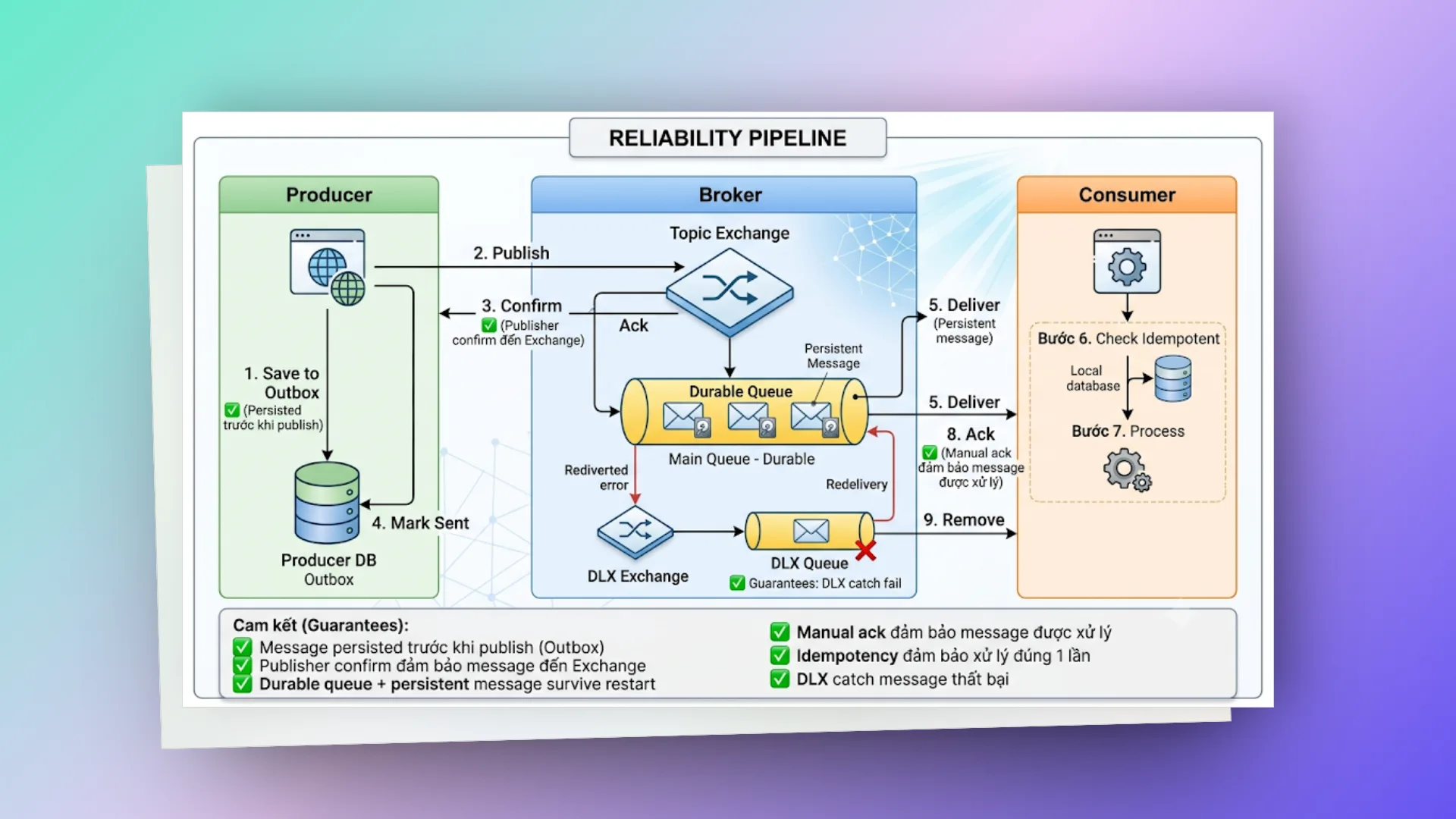
# publisher confirms (xác nhận từ phía người gửi)
Cơ chế này giúp Producer chắc chắn rằng message đã truyền tới được Exchange của RabbitMQ thành công.
Producer ── publish ──▶ Exchange
         ◀──confirm──
Mặc dù trong file cấu hình Spring Boot ở trên chúng ta đã bật sẵn publisher-confirm-type: correlated, nhưng để tăng tính tin cậy tuyệt đối (đặc biệt khi mạng chập chờn hoặc Broker quá tải), chúng ta nên áp dụng Transactional Outbox Pattern:
@Slf4j
@Service
@RequiredArgsConstructor
public class ReliableProducer {

    private final RabbitTemplate rabbitTemplate;
    private final OrderOutboxRepository outboxRepository; // Outbox pattern

    /**
     * Transactional Outbox Pattern:
     * 1. Save message vào DB (cùng transaction với business logic)
     * 2. Publish message đến RabbitMQ
     * 3. Nếu publish thành công → mark as sent
     * 4. Nếu publish thất bại → scheduler retry
     */
    @Transactional
    public void publishWithOutbox(OrderEvent event) {
        // Step 1: Save to outbox table
        OrderOutbox outbox = OrderOutbox.builder()
                .messageId(UUID.randomUUID().toString())
                .exchange(RabbitMQConfig.ORDER_EXCHANGE)
                .routingKey("order." + event.getEventType())
                .payload(objectMapper.writeValueAsString(event))
                .status(OutboxStatus.PENDING)
                .createdAt(LocalDateTime.now())
                .build();
        outboxRepository.save(outbox);

        // Step 2: Try to publish
        try {
            CorrelationData correlationData = new CorrelationData(outbox.getMessageId());
            rabbitTemplate.convertAndSend(
                    outbox.getExchange(),
                    outbox.getRoutingKey(),
                    event,
                    correlationData
            );

            // Step 3: Mark as sent (confirm callback sẽ verify)
            outbox.setStatus(OutboxStatus.SENT);
            outboxRepository.save(outbox);
        } catch (Exception e) {
            log.error("Failed to publish message: {}", outbox.getMessageId(), e);
            // Message vẫn ở PENDING → scheduler sẽ retry
        }
    }

    /**
     * Scheduler retry cho messages PENDING quá lâu.
     * Chạy mỗi 30 giây.
     */
    @Scheduled(fixedDelay = 30000)
    public void retryPendingMessages() {
        List<OrderOutbox> pendingMessages = outboxRepository
                .findByStatusAndCreatedAtBefore(
                        OutboxStatus.PENDING,
                        LocalDateTime.now().minusMinutes(1)
                );

        for (OrderOutbox outbox : pendingMessages) {
            try {
                rabbitTemplate.convertAndSend(
                        outbox.getExchange(),
                        outbox.getRoutingKey(),
                        objectMapper.readValue(outbox.getPayload(), OrderEvent.class)
                );
                outbox.setStatus(OutboxStatus.SENT);
                outbox.setRetryCount(outbox.getRetryCount() + 1);
            } catch (Exception e) {
                outbox.setRetryCount(outbox.getRetryCount() + 1);
                if (outbox.getRetryCount() >= 5) {
                    outbox.setStatus(OutboxStatus.FAILED);
                    log.error("Message permanently failed after 5 retries: {}",
                            outbox.getMessageId());
                }
            }
            outboxRepository.save(outbox);
        }
    }
}
# consumer idempotency (tránh xử lý trùng lặp)
Trong hệ thống phân tán với cơ chế truyền tin ít nhất một lần (At-Least-Once Delivery), tin nhắn hoàn toàn có thể bị gửi trùng lặp do sự cố đường truyền (ví dụ Consumer đã xử lý xong nhưng mất kết nối nên không kịp gửi ack về). Do đó, Consumer bắt buộc phải được thiết kế theo cơ chế Idempotent (đảm bảo dù nhận tin nhiều lần thì kết quả cuối cùng vẫn không thay đổi).
@Slf4j
@Component
@RequiredArgsConstructor
public class IdempotentOrderConsumer {

    private final ProcessedMessageRepository processedMessageRepo;
    private final OrderService orderService;

    @RabbitListener(queues = "order.processing.queue")
    public void handleOrderEvent(
            @Payload OrderEvent event,
            @Header(AmqpHeaders.DELIVERY_TAG) long deliveryTag,
            @Header(value = AmqpHeaders.MESSAGE_ID, required = false) String messageId,
            Channel channel) throws IOException {

        // Idempotency check — đã xử lý message này chưa?
        if (messageId != null && processedMessageRepo.existsByMessageId(messageId)) {
            log.warn("Duplicate message detected, skipping: messageId={}", messageId);
            channel.basicAck(deliveryTag, false); // Ack để không nhận lại
            return;
        }

        try {
            // Process order
            orderService.processOrder(event);

            // Mark as processed
            if (messageId != null) {
                processedMessageRepo.save(new ProcessedMessage(
                        messageId,
                        event.getOrderId(),
                        LocalDateTime.now()
                ));
            }

            channel.basicAck(deliveryTag, false);
        } catch (Exception e) {
            log.error("Error processing order: {}", event.getOrderId(), e);
            channel.basicReject(deliveryTag, false);
        }
    }
}
# tổng hợp reliability flow
# dead letter exchange — xử lý message thất bại
Dead Letter Exchange (DLX) giống như "phòng cấp cứu" hoặc "nghĩa trang" cho message. Khi một tin nhắn không thể xử lý thành công vì lý do nào đó, thay vì để nó biến mất không dấu vết hoặc làm tắc nghẽn queue chính, chúng ta chuyển nó sang DLX để lưu trữ, phân tích hoặc xử lý thủ công sau.
# khi nào message trở thành "dead letter"?
Có 3 trường hợp phổ biến khiến một message bị chuyển sang DLX:
- Consumer reject hoặc nack message với tham số
requeue=false. - Hết hạn thời gian sống (TTL expired) — message nằm trong queue quá lâu mà không có ai consume.
- Vượt quá dung lượng (Queue full) — hàng đợi đạt tới giới hạn độ dài tối đa (
x-max-length).
# sơ đồ luồng dlx
                    ┌─────────────┐
                    │ Main Queue  │
                    │ (order.q)   │
                    └──────┬──────┘
                           │
                    Consumer reject
                    hoặc TTL expired
                           │
                           ▼
                    ┌─────────────┐
                    │ DLX Exchange│
                    └──────┬──────┘
                           │
                           ▼
                    ┌─────────────┐
                    │  DLX Queue  │──▶ DLX Consumer
                    │  (parking)  │    (analyze, retry, alert)
                    └─────────────┘
# dlx consumer — phân tích và xử lý sự cố
@Slf4j
@Component
@RequiredArgsConstructor
public class DeadLetterConsumer {

    private final RabbitTemplate rabbitTemplate;
    private final AlertService alertService;

    /**
     * Consumer cho Dead Letter Queue.
     * Phân tích nguyên nhân fail và quyết định:
     * 1. Retry (gửi lại main queue)
     * 2. Alert (thông báo team)
     * 3. Archive (lưu lại để debug)
     */
    @RabbitListener(queues = "dlx.queue")
    public void handleDeadLetter(
            org.springframework.amqp.core.Message message,
            @Header(AmqpHeaders.DELIVERY_TAG) long deliveryTag,
            Channel channel) throws IOException {

        // Lấy thông tin về nguyên nhân dead letter
        Map<String, Object> headers = message.getMessageProperties().getHeaders();
        List<Map<String, Object>> xDeath = (List<Map<String, Object>>) headers.get("x-death");

        if (xDeath != null && !xDeath.isEmpty()) {
            Map<String, Object> deathInfo = xDeath.get(0);
            String reason = (String) deathInfo.get("reason");      // "rejected", "expired", "maxlen"
            String queue = (String) deathInfo.get("queue");         // Queue gốc
            Long count = (Long) deathInfo.get("count");             // Số lần dead letter
            String exchange = (String) deathInfo.get("exchange");   // Exchange gốc

            log.error("Dead letter received: reason={}, queue={}, count={}, exchange={}",
                    reason, queue, count, exchange);

            // Retry logic dựa trên số lần fail
            if (count != null && count < 3) {
                // Retry — gửi lại queue gốc sau delay
                log.info("Retrying message (attempt {}): queue={}", count + 1, queue);

                // Delay trước khi retry (exponential backoff)
                try {
                    Thread.sleep(Math.min(1000 * (long) Math.pow(2, count), 30000));
                } catch (InterruptedException e) {
                    Thread.currentThread().interrupt();
                }

                rabbitTemplate.convertAndSend(exchange,
                        message.getMessageProperties().getReceivedRoutingKey(),
                        message);
            } else {
                // Đã retry quá nhiều — alert và archive
                log.error("Message permanently failed after {} attempts. Alerting team.", count);
                alertService.sendAlert(
                        "Dead Letter Alert",
                        String.format("Message failed %d times in queue %s. Manual intervention needed.",
                                count, queue)
                );
                // Archive to database for later analysis
                // deadLetterRepository.save(...)
            }
        }

        channel.basicAck(deliveryTag, false);
    }
}
# thử lại với delay queue pattern (tránh nghẽn hàng loạt)
Khi xảy ra lỗi tạm thời (ví dụ DB timeout), việc thử lại (retry) lập tức đôi khi chỉ làm hệ thống quá tải thêm (hiện tượng Thundering Herd). Giải pháp tốt nhất là sử dụng một Delay Queue trung gian để tạm giữ message một thời gian trước khi đẩy lại về Queue chính:
@Configuration
public class RetryQueueConfig {

    // Retry queue với TTL — message tự động quay lại main queue sau delay
    @Bean
    public Queue retryQueue() {
        return QueueBuilder
                .durable("order.retry.queue")
                .withArgument("x-dead-letter-exchange", RabbitMQConfig.ORDER_EXCHANGE)
                .withArgument("x-dead-letter-routing-key", "order.created")
                .withArgument("x-message-ttl", 5000) // 5 giây delay
                .build();
    }

    // Binding retry queue đến DLX exchange
    @Bean
    public Binding retryBinding() {
        return BindingBuilder
                .bind(retryQueue())
                .to(new DirectExchange(RabbitMQConfig.DLX_EXCHANGE))
                .with("retry.order");
    }
}
Flow: Main Queue → reject → DLX → Retry Queue (wait 5s) → TTL expire → Main Queue
↓
Consumer retry
# tối ưu hóa hiệu năng & best practices
# prefetch count (sweet spot)
Prefetch Count quyết định số lượng message tối đa mà RabbitMQ có thể đẩy xuống cho một Consumer khi chưa nhận được tín hiệu xác nhận (ack) từ Consumer đó.
prefetch = 1:  Chậm nhưng phân phối đều (fair distribution)
               Mỗi consumer chỉ nhận 1 message tại một thời điểm.
               Thích hợp khi thời gian xử lý giữa các message chênh lệch lớn.

prefetch = 10-50: Tối ưu cho hầu hết trường hợp (Balanced)
                  Đảm bảo throughput tốt và vẫn chia đều tải.
                  Nên dùng cho phần lớn ứng dụng Backend.

prefetch = 250+: High throughput
                 Consumer dễ bị ngợp nếu gặp message nặng.
                 Chỉ dùng khi thời gian xử lý siêu nhanh (< 1ms).
# application.yml
spring:
  rabbitmq:
    listener:
      simple:
        prefetch: 25 # Sweet spot cho hầu hết use case
# quản lý connection và channel hiệu quả
// SAI — Tạo connection mỗi lần publish
public void badPublish(String message) {
    ConnectionFactory factory = new ConnectionFactory();
    Connection connection = factory.newConnection();  // Tốn kém!
    Channel channel = connection.createChannel();     // Mỗi lần!
    channel.basicPublish(...);
    channel.close();
    connection.close();
}

// ĐÚNG — Spring Boot quản lý connection pool
// RabbitTemplate tự động reuse connection và channel
@Autowired
private RabbitTemplate rabbitTemplate;

public void goodPublish(OrderEvent event) {
    rabbitTemplate.convertAndSend("exchange", "routing.key", event);
    // Connection và channel được pool và reuse
}
# message size (kích thước tin nhắn)
Rule of thumb:
- < 128KB: Lý tưởng
- 128KB - 1MB: OK nhưng cân nhắc
- > 1MB: KHÔNG NÊN — dùng Claim Check pattern

Claim Check Pattern:
1. Upload large payload lên S3/MinIO
2. Gửi message chỉ chứa reference (URL/key)
3. Consumer download payload từ S3/MinIO
// Claim Check Pattern
public class ClaimCheckProducer {

    private final RabbitTemplate rabbitTemplate;
    private final S3Client s3Client;

    public void publishLargePayload(byte[] largePayload, String orderId) {
        // 1. Upload to S3
        String s3Key = "messages/" + orderId + "/" + UUID.randomUUID();
        s3Client.putObject(PutObjectRequest.builder()
                .bucket("message-payloads")
                .key(s3Key)
                .build(), RequestBody.fromBytes(largePayload));

        // 2. Publish reference only
        Map<String, String> claimCheck = Map.of(
                "orderId", orderId,
                "payloadRef", s3Key,
                "payloadSize", String.valueOf(largePayload.length)
        );
        rabbitTemplate.convertAndSend("order.exchange", "order.created", claimCheck);
    }
}
# batch publishing (gửi tin nhắn hàng loạt)
// Batch publish cho high-throughput scenarios
public void batchPublish(List<OrderEvent> events) {
    rabbitTemplate.invoke(operations -> {
        for (OrderEvent event : events) {
            operations.convertAndSend(
                    RabbitMQConfig.ORDER_EXCHANGE,
                    "order." + event.getEventType(),
                    event
            );
        }
        // Tất cả message được gửi trong cùng một channel operation
        // Giảm overhead so với gửi từng message
        return null;
    });
}
# giám sát chỉ số (monitoring metrics)
# application.yml — Enable RabbitMQ metrics với Micrometer
management:
  endpoints:
    web:
      exposure:
        include: health,metrics,prometheus
  metrics:
    tags:
      application: order-service

# Metrics quan trọng cần monitor:
# - rabbitmq.consumed: Số message consumed
# - rabbitmq.published: Số message published
# - rabbitmq.acknowledged: Số message acked
# - rabbitmq.rejected: Số message rejected
# - rabbitmq.channels: Số channels active
# - spring.rabbitmq.listener: Listener container metrics
# tóm tắt best practices checklist
Message Design:
✅ Dùng JSON serialization (Jackson2JsonMessageConverter)
✅ Luôn set messageId cho idempotency
✅ Luôn set correlationId cho tracing
✅ Giữ message size < 128KB
✅ Version message schema (header "version": "1.0")

Queue Design:
✅ Durable queues cho production
✅ Persistent messages (delivery_mode = 2)
✅ Set TTL để tránh queue grow vô hạn
✅ Set max-length để protect memory
✅ Luôn configure DLX

Consumer Design:
✅ Manual acknowledgment
✅ Idempotent processing
✅ Proper error handling (business vs transient errors)
✅ Prefetch count phù hợp
✅ Graceful shutdown

Infrastructure:
✅ Cluster mode cho HA (ít nhất 3 nodes)
✅ Quorum queues thay vì classic mirrored queues (RabbitMQ 3.8+)
✅ Monitoring với Prometheus + Grafana
✅ Alerting cho queue depth, consumer count, memory usage
# rabbitmq vs kafka — khi nào nên dùng gì?
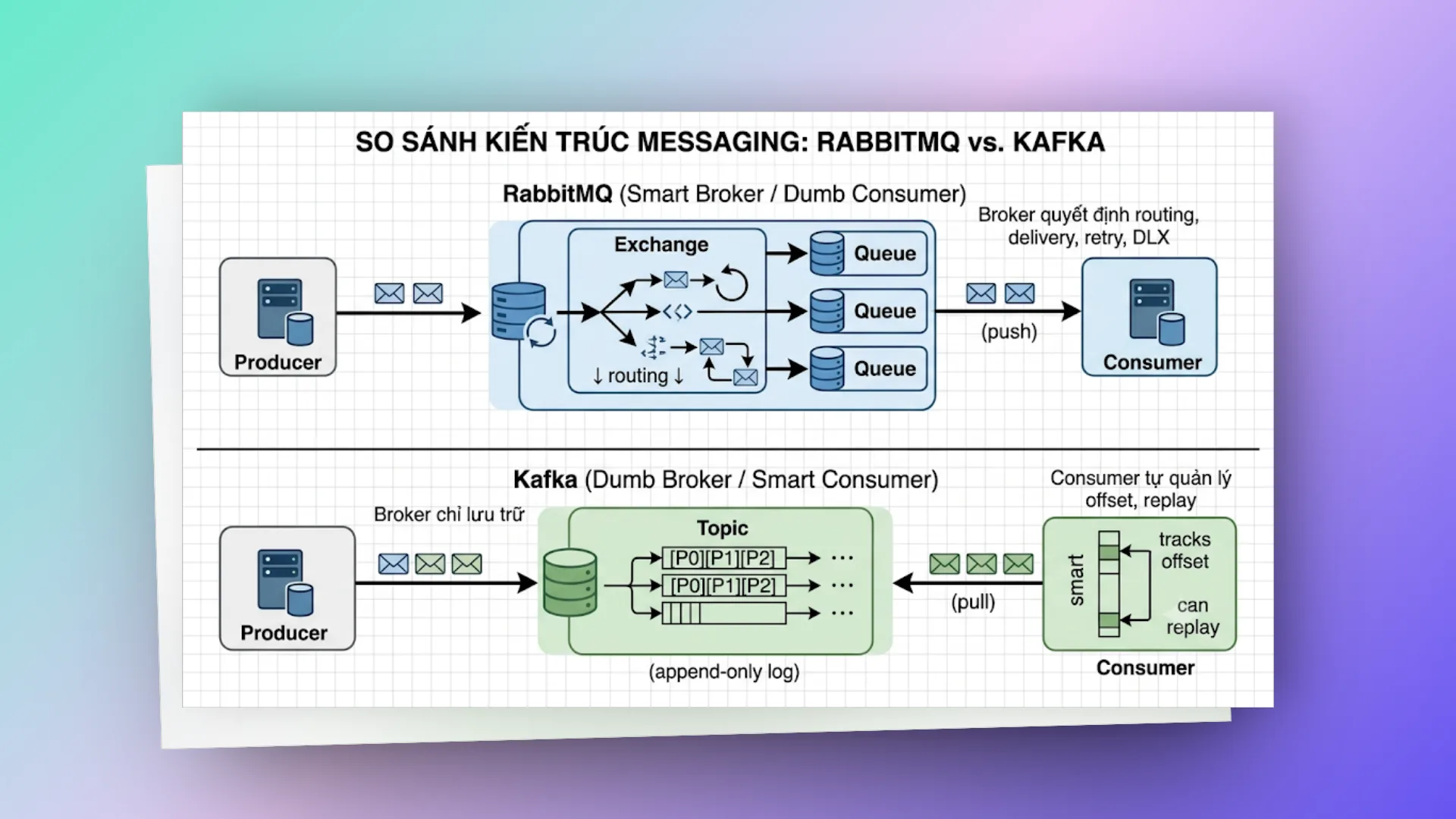
Đây có lẽ là câu hỏi kinh điển nhất mà lập trình viên nào cũng tự đặt ra. Câu trả lời ngắn gọn: hai hệ thống này sinh ra để giải quyết các bài toán hoàn toàn khác nhau.
# khác biệt về mặt kiến trúc
# so sánh chi tiết các tiêu chí
| Tiêu chí | RabbitMQ | Kafka |
|---|---|---|
| Model | Message Queue (push) | Event Log (pull) |
| Routing | Flexible (exchange types) | Topic + partition |
| Message sau consume | Xóa khỏi queue | Giữ lại (retention) |
| Replay | Không (message đã xóa) | Có (reset offset) |
| Ordering | Per-queue guarantee | Per-partition guarantee |
| Throughput | ~50K msg/s per queue | ~1M msg/s per topic |
| Latency | Rất thấp (< 1ms) | Thấp (< 10ms) |
| Consumer Groups | Competing consumers | Consumer groups native |
| Protocol | AMQP, MQTT, STOMP | Custom binary protocol |
| Use case chính | Task queue, RPC, routing | Event streaming, log aggregation |
# khi nào nên chọn rabbitmq?
✅ Task queue — distribute work giữa workers
✅ RPC pattern — request/reply
✅ Complex routing — route message dựa trên nhiều criteria
✅ Priority queue — xử lý message quan trọng trước
✅ Message TTL — message tự expire
✅ Khi cần flexible acknowledgment
✅ Khi message không cần replay
✅ Khi team quen với traditional messaging
# khi nào nên chọn kafka?
✅ Event sourcing — lưu trữ toàn bộ event history
✅ Stream processing — xử lý data real-time
✅ Log aggregation — collect logs từ nhiều service
✅ Khi cần replay messages
✅ Khi throughput cực cao (> 100K msg/s)
✅ Khi nhiều consumer cần đọc cùng data
✅ CDC (Change Data Capture)
✅ Khi cần long-term message retention
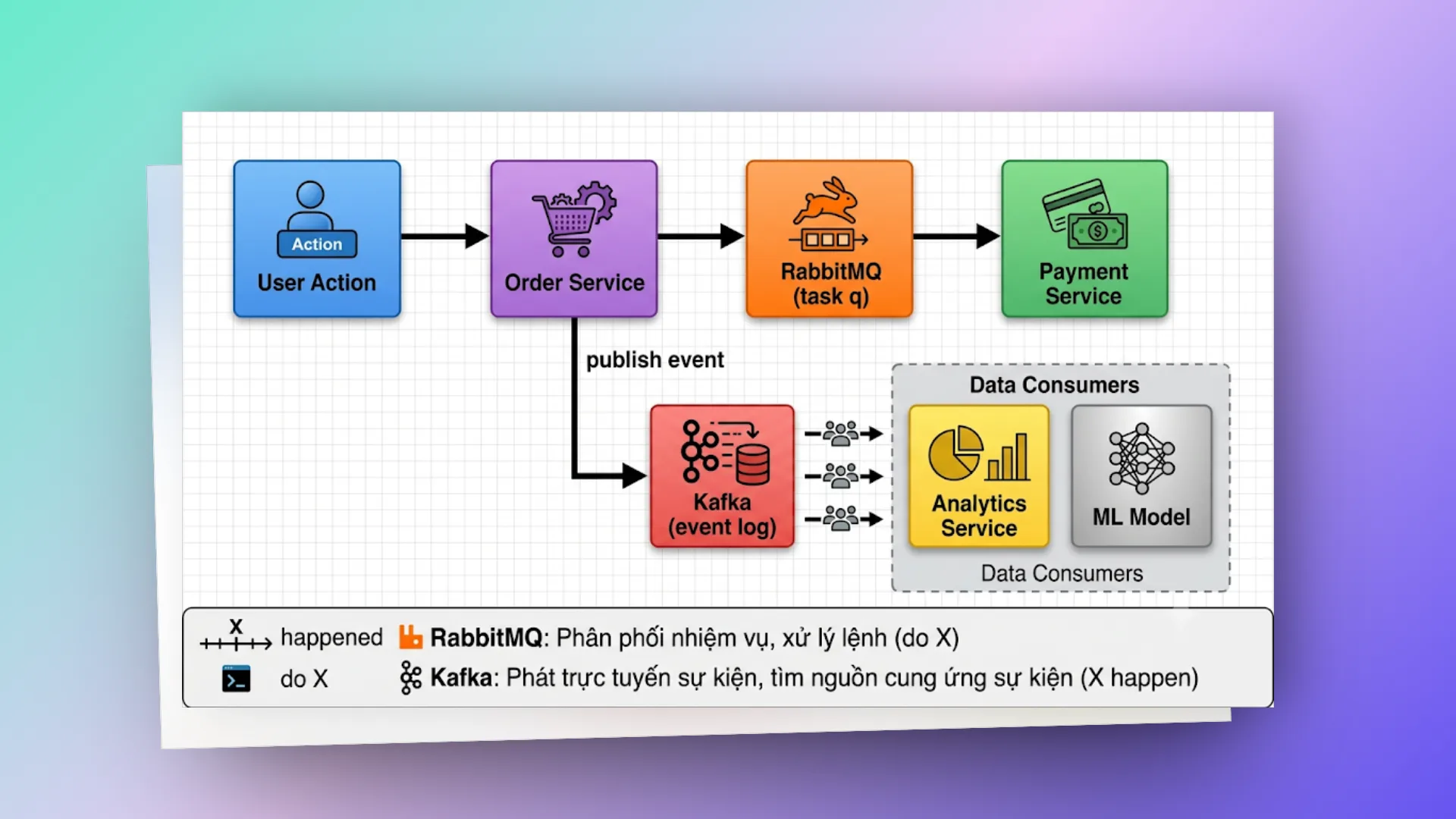
# có thể kết hợp cả hai không?
Absolutely. Trong nhiều hệ thống lớn:
# production readiness checklist
Trước khi đưa hệ thống lên chạy thật (Production), hãy chắc chắn rằng bạn đã rà soát và cấu hình đầy đủ các yếu tố sau:
# cấu hình hạ tầng (infrastructure)
□ Cluster với ít nhất 3 nodes (odd number cho quorum)
□ Quorum queues thay vì classic mirrored queues
□ Separate disk cho RabbitMQ data directory
□ Memory alarm threshold: 0.4 (default) hoặc thấp hơn
□ Disk alarm threshold: ít nhất 2x RAM
□ TLS/SSL cho connections
□ Firewall rules: chỉ mở port cần thiết
  - 5672: AMQP
  - 5671: AMQPS (TLS)
  - 15672: Management UI (restrict access)
  - 25672: Inter-node communication
□ Separate vhost cho mỗi application/environment
□ Non-default credentials (KHÔNG dùng guest/guest)
# cấu hình ứng dụng (application)
□ Connection recovery enabled (Spring Boot default: true)
□ Publisher confirms enabled
□ Manual acknowledgment
□ Idempotent consumers
□ Dead Letter Exchange configured
□ Proper error handling (business vs transient)
□ Message TTL set
□ Queue max-length set
□ Graceful shutdown handling
□ Health check endpoint include RabbitMQ
# giám sát & cảnh báo (monitoring & alerting)
□ Queue depth monitoring (alert khi > threshold)
□ Consumer count monitoring (alert khi = 0)
□ Memory usage monitoring
□ Disk usage monitoring
□ Connection count monitoring
□ Channel count monitoring
□ Message rate monitoring (publish/consume)
□ Unacked message count monitoring
□ Node health monitoring
□ Grafana dashboard cho RabbitMQ metrics
# spring boot health check
# application.yml
management:
  endpoint:
    health:
      show-details: always
  health:
    rabbit:
      enabled: true # Auto-configured khi spring-boot-starter-amqp có mặt


# Response:
# {
#   "status": "UP",
#   "components": {
#     "rabbit": {
#       "status": "UP",
#       "details": {
#         "version": "3.12.0"
#       }
#     }
#   }
# }
# lời kết
RabbitMQ chắc chắn không phải là một "viên đạn bạc" giải quyết được mọi vấn đề, nhưng nó luôn là một trong những công cụ đáng tin cậy nhất trong hộp đồ nghề của bất kỳ Backend Engineer nào khi bước vào thế giới hệ thống phân tán (Distributed Systems).
Một vài điểm cốt lõi mình hy vọng bạn sẽ nhớ sau bài viết này:
- Hiểu kiến trúc trước khi bắt tay vào code: Nắm vững Exchange, Queue, Binding và cơ chế hoạt động của Channel sẽ giúp bạn tự tin hơn rất nhiều khi debug hoặc thiết kế hệ thống.
- Tính tin cậy (Reliability) không tự nhiên mà có: Publisher confirms, manual ack, idempotent consumers, DLX... mỗi thành phần là một lớp bảo vệ. Trên môi trường Production chạy thật, bạn sẽ cần tất cả chúng để đảm bảo dữ liệu không bị thất thoát.
- Chọn đúng công cụ cho đúng bài toán: Dùng RabbitMQ khi cần định tuyến tin nhắn linh hoạt, phân phối tác vụ (task queue) và xử lý yêu cầu phản hồi nhanh bất đồng bộ. Dùng Kafka khi cần lưu lại vết lịch sử sự kiện (event sourcing), stream dữ liệu thời gian thực hoặc cần replay message.
- Luôn luôn giám sát (Monitor): Đừng đợi đến khi hệ thống sập mới đi tìm nguyên nhân. Hãy thiết lập các cảnh báo về độ dài hàng đợi (queue depth), số lượng consumer online và mức độ sử dụng tài nguyên RAM/Disk của broker để phát hiện lỗi sớm nhất có thể.
Tài liệu tham khảo:
- RabbitMQ Official Documentation
- Spring AMQP Reference
- AMQP 0-9-1 Protocol Specification
- RabbitMQ in Depth — Gavin M. Roy (Manning)
- Enterprise Integration Patterns — Hohpe & Woolf
Chỉ là những ghi chép cá nhân với hy vọng mang lại chút giá trị. Nếu thấy hữu ích, đừng ngại chia sẻ cho bạn bè & đồng nghiệp nhé!
Happy coding 😎 👍🏻 🚀 🔥.
On this page
- # Message Queue là gì
- # vấn đề thực tế mà Message Queue giải quyết
- # lý do cốt lõi để áp dụng message queue
- # RabbitMQ — Bức tranh toàn cảnh
- # RabbitMQ là gì?
- # lịch sử phát triển
- # những ông lớn nào đang dùng rabbitmq?
- # kiến trúc bên trong rabbitmq
- # các thành phần cốt lõi
- # các thành phần
- # connection & channel
- # virtual host (vhost)
- # amqp protocol
- # vòng đời của một message
- # message properties (thuộc tính tin nhắn)
- # acknowledgment — cơ chế xác nhận tin nhắn
- # exchange types — bộ não định tuyến
- # direct exchange
- # fanout exchange
- # topic exchange
- # headers exchange
- # so sánh nhanh
- # spring boot + rabbitmq!
- # setup dự án
- # rabbitmq config
- # domain models
- # producer — gửi message
- # consumer — nhận và xử lý message
- # notification consumers
- # rest controller — trigger point
- # chạy thử
- # reliability patterns
- # publisher confirms (xác nhận từ phía người gửi)
- # consumer idempotency (tránh xử lý trùng lặp)
- # tổng hợp reliability flow
- # dead letter exchange — xử lý message thất bại
- # khi nào message trở thành "dead letter"?
- # sơ đồ luồng dlx
- # dlx consumer — phân tích và xử lý sự cố
- # thử lại với delay queue pattern (tránh nghẽn hàng loạt)
- # tối ưu hóa hiệu năng & best practices
- # prefetch count (sweet spot)
- # quản lý connection và channel hiệu quả
- # message size (kích thước tin nhắn)
- # batch publishing (gửi tin nhắn hàng loạt)
- # giám sát chỉ số (monitoring metrics)
- # tóm tắt best practices checklist
- # rabbitmq vs kafka — khi nào nên dùng gì?
- # khác biệt về mặt kiến trúc
- # so sánh chi tiết các tiêu chí
- # khi nào nên chọn rabbitmq?
- # khi nào nên chọn kafka?
- # có thể kết hợp cả hai không?
- # production readiness checklist
- # cấu hình hạ tầng (infrastructure)
- # cấu hình ứng dụng (application)
- # giám sát & cảnh báo (monitoring & alerting)
- # spring boot health check
- # lời kết