

model context protocol
- Published on
- /8 mins read/
# mcp là gì và tại sao nó quan trọng?
Hãy tưởng tượng bạn có Claude, GPT-4, hay Gemini — powerful nhưng bị giam trong sandbox. Muốn nó đọc Jira ticket? Viết code riêng. Muốn nó query database? Viết code riêng. Muốn nó tạo Confluence page? Lại viết code riêng. Mỗi integration = custom code, không reusable, không standardized.
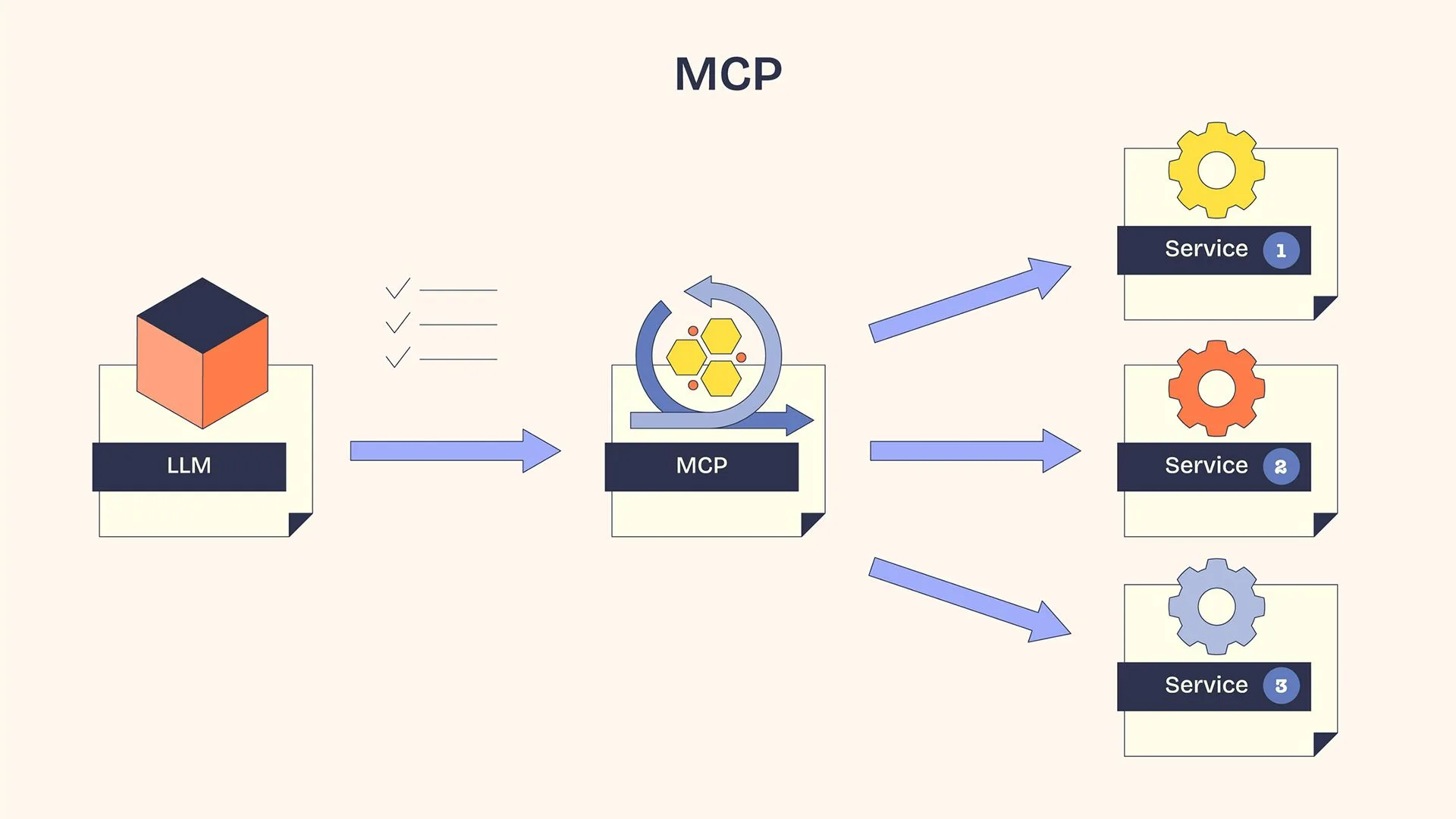
Model Context Protocol (MCP) giải quyết vấn đề này. Nó là open standard (do Anthropic khởi xướng, November 2024) định nghĩa cách AI models kết nối với external tools, data sources, và services — theo 1 protocol thống nhất.
Analogy: HTTP chuẩn hóa cách web browsers nói chuyện với web servers. MCP chuẩn hóa cách AI assistants nói chuyện với external systems. Trước HTTP, mỗi browser-server pair cần protocol riêng. Trước MCP, mỗi AI-tool pair cần integration riêng.
# trước mcp (n×m problem):
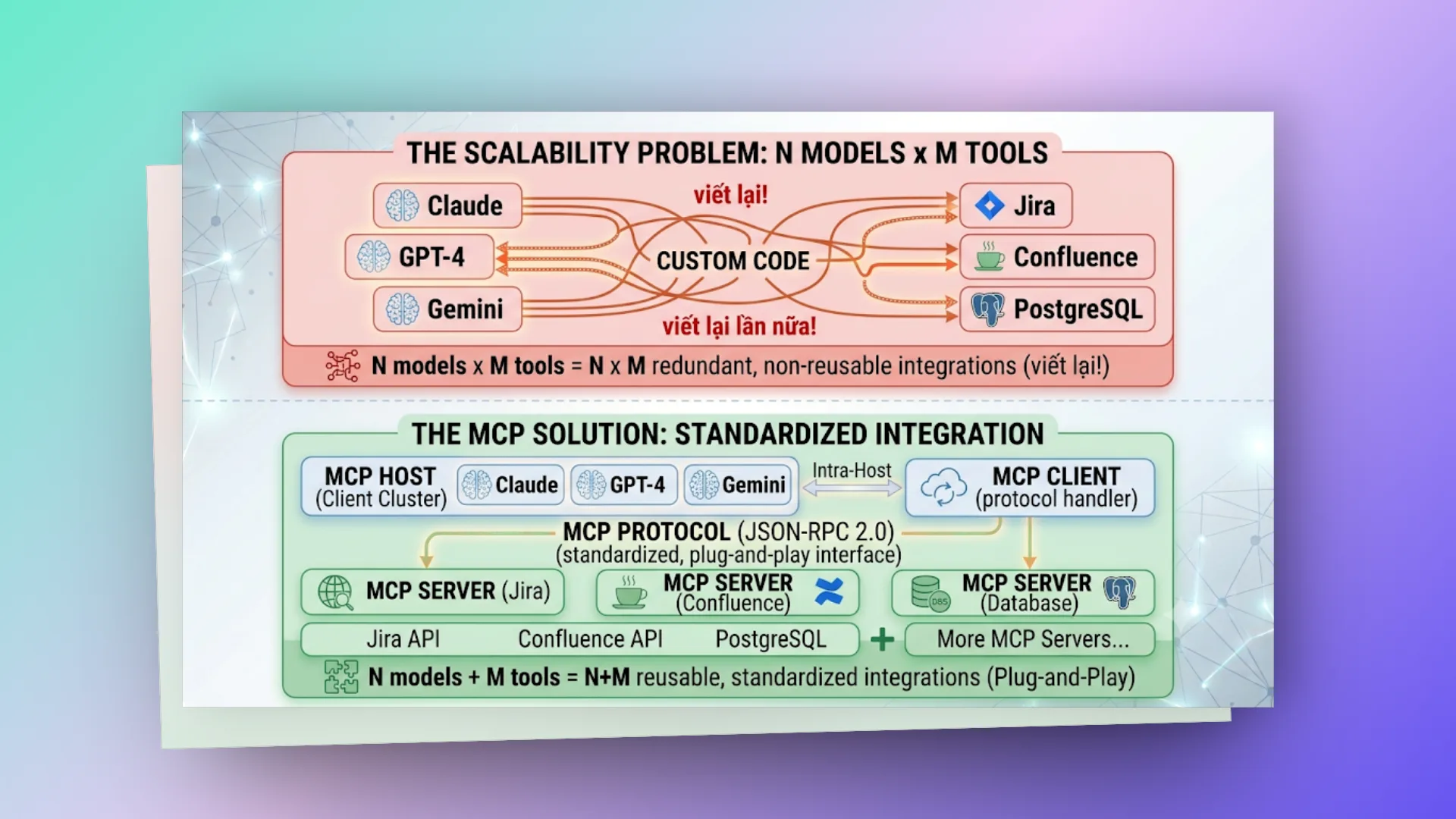
Claude ──── Custom code ──── Jira
Claude ──── Custom code ──── Confluence
Claude ──── Custom code ──── PostgreSQL
GPT-4 ──── Custom code ──── Jira (viết lại!)
GPT-4 ──── Custom code ──── Confluence (viết lại!)
Gemini ──── Custom code ──── Jira (viết lại lần nữa!)

N models × M tools = N×M integrations
# sau mcp (n+m solution):
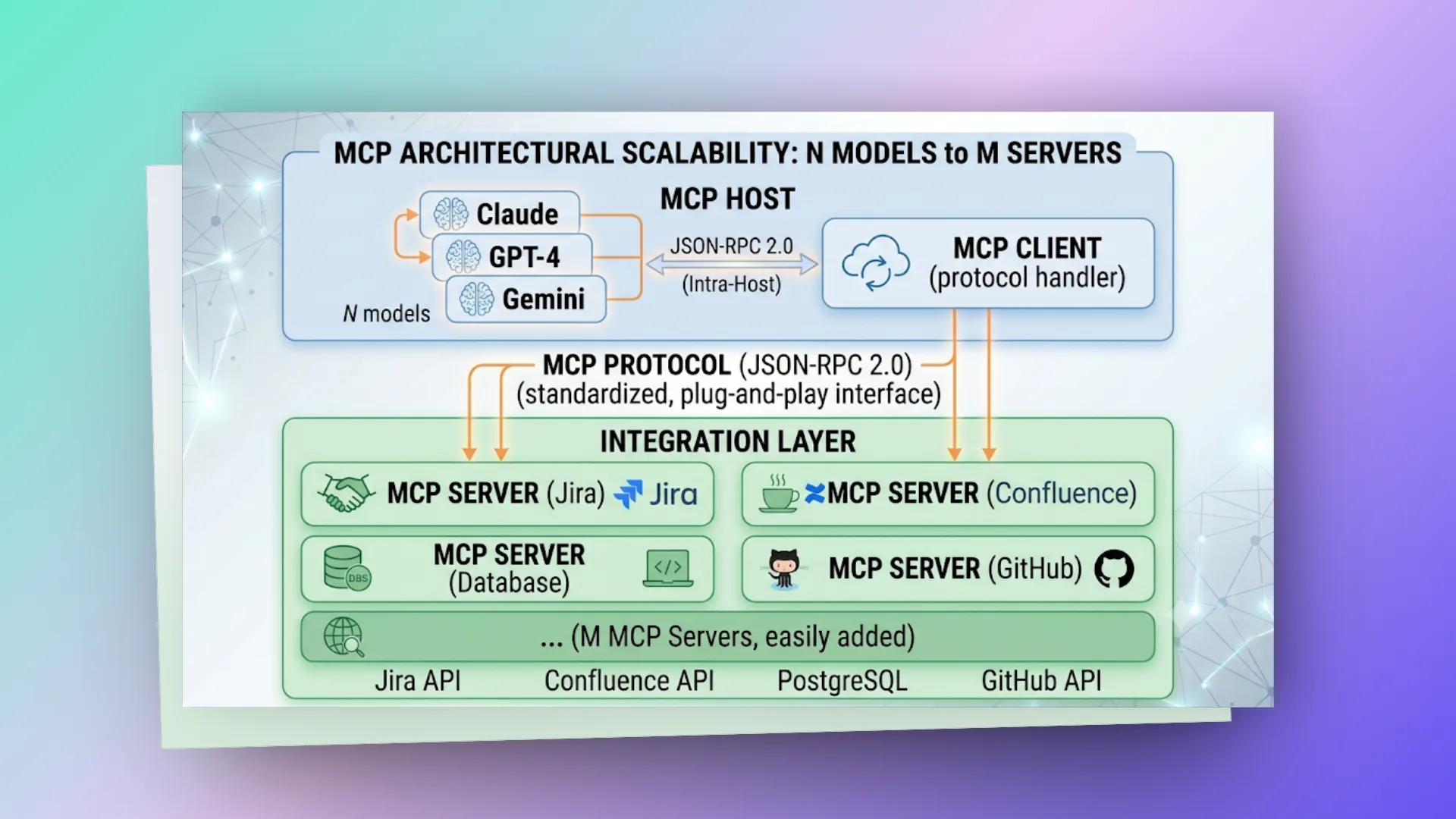
Điểm mấu chốt của kiến trúc:
- Mô hình cũ (Tích hợp phân tán): Nếu không có một giao thức chung, mỗi khi có một model mới (ví dụ: DeepSeek) hoặc một công cụ mới cần đọc dữ liệu, lập trình viên sẽ phải viết lại adapter kết nối từ đầu cho từng cặp thiết bị.
- Mô hình MCP (
N + M): Bất kỳ một mô hình nào khi đã tuân thủ client-side của giao thức MCP đều có thể "nói chuyện" ngay lập tức với toàn bộ hệ sinh thái các MCP Server sẵn có, giúp hệ thống mở rộng linh hoạt theo mô hình cắm-là-chạy (Plug-and-Play).
# architecture — client-server model
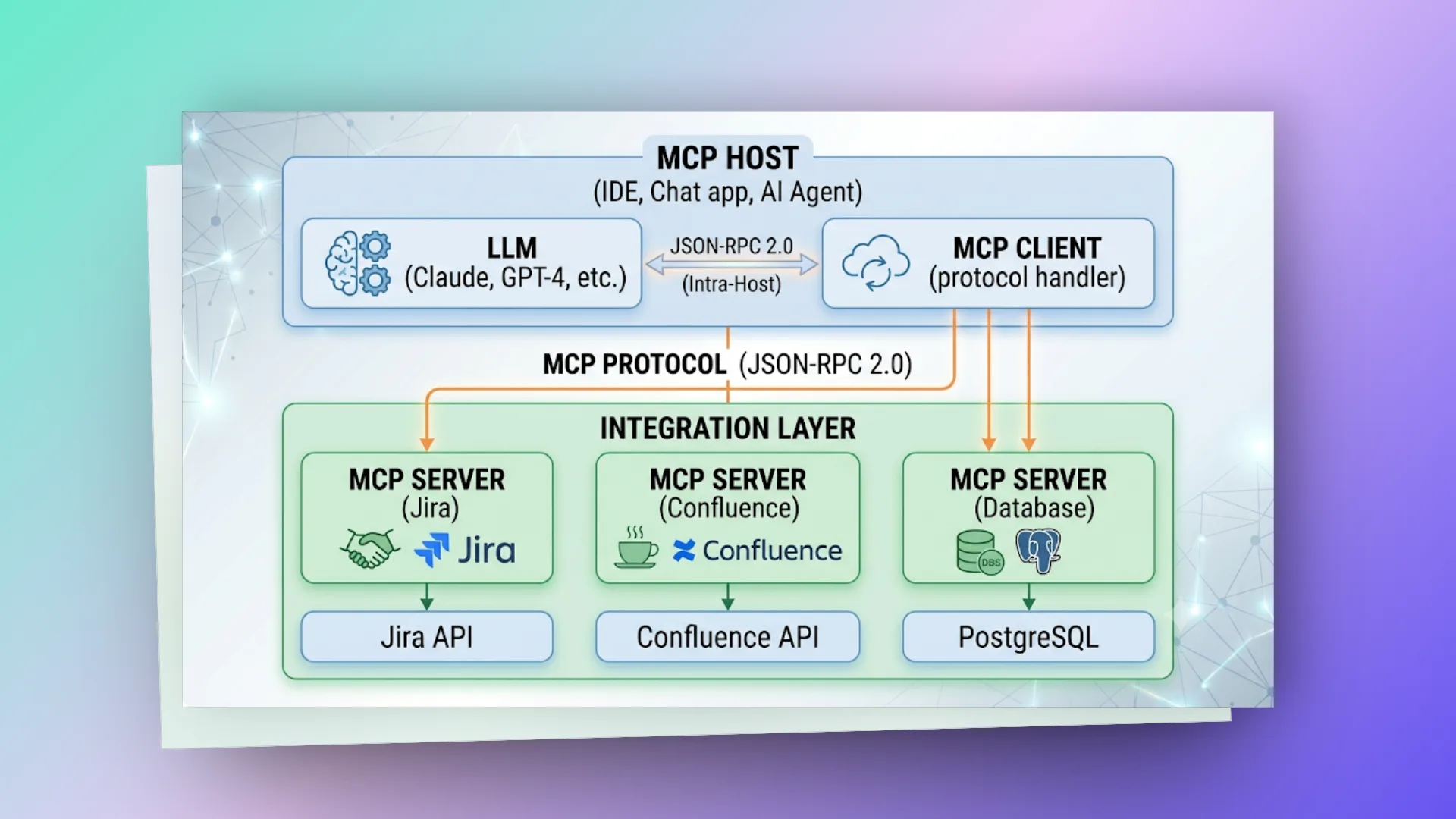
MCP follows client-server architecture. AI application là MCP Client, external systems expose functionality qua MCP Server.
# primitives của mcp:
| Primitive | Direction | Mô tả | Ví dụ |
|---|---|---|---|
| Tools | Client → Server | Actions AI có thể thực hiện | create_issue, search_content |
| Resources | Client → Server | Data AI có thể đọc | file contents, database records |
| Prompts | Server → Client | Pre-built prompt templates | "Summarize this page", "Review this PR" |
# mcp server — cách build
MCP Server expose tools cho AI. Mỗi tool có name, description (cho AI hiểu khi nào dùng), input schema (parameters), và implementation.
# python mcp server (phổ biến nhất):
# jira_mcp_server.py
from mcp.server import Server
from mcp.types import Tool, TextContent
import httpx

server = Server("jira-mcp")

@server.list_tools()
async def list_tools():
   return [
       Tool(
           name="get_issue",
           description="Get detailed information about a Jira issue by its key (e.g., PROJ-123)",
           inputSchema={
               "type": "object",
               "properties": {
                   "issue_key": {
                       "type": "string",
                       "description": "The Jira issue key (e.g., 'PROJ-123')"
                   }
               },
               "required": ["issue_key"]
           }
       ),
       Tool(
           name="create_issue",
           description="Create a new Jira issue in a project",
           inputSchema={
               "type": "object",
               "properties": {
                   "project_key": {"type": "string", "description": "Project key (e.g., 'PROJ')"},
                   "summary": {"type": "string", "description": "Issue title"},
                   "issue_type": {"type": "string", "description": "Type: Bug, Task, Story"},
                   "description": {"type": "string", "description": "Detailed description"}
               },
               "required": ["project_key", "summary", "issue_type"]
           }
       ),
       Tool(
           name="search_issues",
           description="Search Jira issues using JQL query",
           inputSchema={
               "type": "object",
               "properties": {
                   "jql": {"type": "string", "description": "JQL query string"},
                   "max_results": {"type": "integer", "default": 20}
               },
               "required": ["jql"]
           }
       )
   ]

@server.call_tool()
async def call_tool(name: str, arguments: dict):
   if name == "get_issue":
       issue = await jira_client.get_issue(arguments["issue_key"])
       return [TextContent(
           type="text",
           text=f"**{issue['key']}**: {issue['summary']}\n"
                f"Status: {issue['status']}\n"
                f"Assignee: {issue['assignee']}\n"
                f"Description: {issue['description']}"
       )]

   elif name == "create_issue":
       result = await jira_client.create_issue(
           project=arguments["project_key"],
           summary=arguments["summary"],
           issue_type=arguments["issue_type"],
           description=arguments.get("description", "")
       )
       return [TextContent(type="text", text=f"Created issue: {result['key']}")]

   elif name == "search_issues":
       issues = await jira_client.search(arguments["jql"], arguments.get("max_results", 20))
       formatted = "\n".join([f"- {i['key']}: {i['summary']} [{i['status']}]" for i in issues])
       return [TextContent(type="text", text=formatted)]
# transport protocols
MCP supports 2 transport mechanisms:
1. stdio (Standard I/O) — cho local tools
  Host spawns server process, communicate qua stdin/stdout
  Fast, simple, no network overhead
  Use case: local file system, git, local database

2. HTTP + SSE (Server-Sent Events) — cho remote servers
  Client connects via HTTP, server pushes via SSE
  Network-ready, scalable
  Use case: cloud services, shared team tools, SaaS integrations
# configuration (trong ide/ai tool):
// .kiro/settings/mcp.json hoặc tương đương
{
  "mcpServers": {
    "jira": {
      "command": "uvx",
      "args": ["jira-mcp-server@latest"],
      "env": {
        "JIRA_URL": "https://your-company.atlassian.net",
        "JIRA_TOKEN": "${JIRA_API_TOKEN}"
      }
    },
    "confluence": {
      "command": "uvx",
      "args": ["confluence-mcp-server@latest"],
      "env": {
        "CONFLUENCE_URL": "https://your-company.atlassian.net/wiki",
        "CONFLUENCE_TOKEN": "${CONFLUENCE_TOKEN}"
      }
    },
    "postgres": {
      "command": "uvx",
      "args": ["postgres-mcp-server@latest"],
      "env": {
        "DATABASE_URL": "postgresql://user:pass@localhost:5432/mydb"
      }
    }
  }
}
# cách ai sử dụng mcp tools
Khi user hỏi: "Tạo bug ticket cho lỗi login trên Jira project PORTAL"
User message: "Create a bug ticket for the login error in PORTAL project"
               │
               ▼
LLM reasoning: "User wants to create a Jira issue.
               I have tool 'create_issue' available.
               Project = PORTAL, type = Bug, summary about login error"
               │
               ▼
Tool call: create_issue({
   "project_key": "PORTAL",
   "summary": "Login error - users unable to authenticate",
   "issue_type": "Bug",
   "description": "Users reporting inability to login. Need investigation."
})
               │
               ▼
MCP Client → MCP Server (Jira) → Jira REST API → Create issue
               │
               ▼
Response: "Created issue: PORTAL-456"
               │
               ▼
LLM formats response: "Done! I've created PORTAL-456: 'Login error - users unable to authenticate' as a Bug in the PORTAL project."
Key insight: AI quyết định KHI NÀO dùng tool dựa trên tool description. Description tốt = AI dùng đúng lúc. Description tệ = AI dùng sai hoặc không dùng.
# resources & prompts
# resources — Contextual data
Resources cho AI access data mà không cần "action." Khác tools (execute something), resources chỉ "read something."
@server.list_resources()
async def list_resources():
   return [
       Resource(
           uri="jira://project/PORTAL/issues",
           name="PORTAL Project Issues",
           description="All open issues in PORTAL project",
           mimeType="application/json"
       ),
       Resource(
           uri="confluence://space/ENG/pages",
           name="Engineering Space Pages",
           description="All pages in Engineering Confluence space"
       )
   ]

@server.read_resource()
async def read_resource(uri: str):
   if uri == "jira://project/PORTAL/issues":
       issues = await jira_client.get_open_issues("PORTAL")
       return formatted_issues(issues)
# prompts — reusable prompt templates
Prompts = pre-built instructions server cung cấp cho AI. User chọn prompt, AI execute với context.
@server.list_prompts()
async def list_prompts():
   return [
       Prompt(
           name="review-pr",
           description="Review a pull request for code quality and potential issues",
           arguments=[
               PromptArgument(name="pr_number", description="PR number to review", required=True)
           ]
       )
   ]

@server.get_prompt()
async def get_prompt(name: str, arguments: dict):
   if name == "review-pr":
       pr_data = await github_client.get_pr(arguments["pr_number"])
       return GetPromptResult(
           messages=[
               PromptMessage(
                   role="user",
                   content=TextContent(
                       text=f"Review this PR for code quality:\n\n"
                            f"Title: {pr_data['title']}\n"
                            f"Files changed: {pr_data['files']}\n"
                            f"Diff:\n{pr_data['diff']}\n\n"
                            f"Focus on: security, performance, readability."
                   )
               )
           ]
       )
# security considerations
MCP mở AI lên external systems → security critical:
- Principle of least privilege: Server chỉ expose tools cần thiết, không "admin access everything"
- Approval flows: IDE/Host có thể require user approval trước khi execute tool (human-in-the-loop)
- Input validation: Server PHẢI validate mọi input từ AI (AI có thể hallucinate parameters)
- Secret management: Tokens trong env vars, không hardcode, không log
- Rate limiting: Prevent AI từ spam API calls
- Audit logging: Log mọi tool call cho compliance
@server.call_tool()
async def call_tool(name: str, arguments: dict):
   # Always validate
   if name == "delete_issue":
       if not arguments.get("issue_key", "").match(r"^[A-Z]+-\d+$"):
           raise ValueError("Invalid issue key format")

       # Log for audit
       logger.info(f"TOOL_CALL: delete_issue | key={arguments['issue_key']} | user={context.user}")

       # Execute
       return await jira_client.delete_issue(arguments["issue_key"])
# mcp ecosystem (2025-2026)
| Category | Servers available |
|---|---|
| Code & Dev | GitHub, GitLab, Git (local), Linear |
| Documentation | Confluence, Notion, Google Docs |
| Project Management | Jira, Asana, Monday.com |
| Database | PostgreSQL, MongoDB, SQLite, Supabase |
| Communication | Slack, Discord, Email |
| Cloud | AWS, GCP, Azure (documentation + services) |
| File System | Local filesystem, S3, Google Drive |
| Monitoring | Datadog, PagerDuty, Grafana |
| Custom | Any REST API (build your own in hours) |
# khi nào build mcp server?
Build MCP Server khi:
- Team dùng internal tool mà AI cần access (internal JIRA, custom dashboard)
- Có repetitive workflow cần AI automate (create tickets, update docs, deploy)
- Muốn AI assistant hiểu context cụ thể (đọc codebase, query internal DB)
Không cần build khi:
- Community server đã tồn tại (check mcp.so registry)
- Chỉ cần 1-2 simple API calls (prompt engineering đủ)
- Security policy không cho phép AI access system
Effort estimate: Simple MCP server (3-5 tools, 1 data source) = 1-2 ngày development. Complex server (auth, pagination, error handling, tests) = 1 tuần.
Chỉ là những ghi chép cá nhân với hy vọng mang lại chút giá trị. Nếu thấy hữu ích, đừng ngại chia sẻ cho bạn bè & đồng nghiệp nhé!
Happy coding 😎 👍🏻 🚀 🔥.
On this page
- # mcp là gì và tại sao nó quan trọng?
- # trước mcp (n×m problem):
- # sau mcp (n+m solution):
- # architecture — client-server model
- # primitives của mcp:
- # mcp server — cách build
- # python mcp server (phổ biến nhất):
- # transport protocols
- # configuration (trong ide/ai tool):
- # cách ai sử dụng mcp tools
- # resources & prompts
- # resources — Contextual data
- # prompts — reusable prompt templates
- # security considerations
- # mcp ecosystem (2025-2026)
- # khi nào build mcp server?