


loại performance test
| Loại test | Mục đích | Ví dụ |
|---|---|---|
| Load Test | Kiểm tra với tải bình thường/dự kiến | 500 concurrent users trong 10 phút |
| Stress Test | Tìm giới hạn chịu tải tối đa | Tăng dần từ 100 → 5000 users |
| Spike Test | Kiểm tra đột biến tải | 0 → 2000 users trong 10 giây |
| Soak/Endurance Test | Kiểm tra memory leak, resource drain | 200 users liên tục 24 giờ |
| Scalability Test | Đo khả năng mở rộng | So sánh 1 instance vs 3 instances |
# cài đặt & cấu hình
# cài đặt jmeter
# Download từ https://jmeter.apache.org/download_jmeter.cgi
# Giải nén và chạy
cd apache-jmeter-5.6.3/bin

# Windows
jmeter.bat

# Linux/Mac
./jmeter.sh
Cấu hình JVM cho JMeter (test lớn)
# File: bin/jmeter.bat hoặc bin/jmeter
# Tăng heap cho JMeter khi chạy test lớn (>1000 threads)
HEAP="-Xms2g -Xmx4g"
# kiến trúc jmeter — các thành phần chính
Test Plan
├── Thread Group (mô phỏng virtual users)
│   ├── Sampler (HTTP Request, JDBC, etc.)
│   ├── Config Element (Header Manager, Cookie Manager, CSV Data)
│   ├── Pre-Processor (JSR223, User Parameters)
│   ├── Post-Processor (JSON Extractor, Regex Extractor)
│   ├── Assertion (Response Assertion, Duration Assertion)
│   └── Timer (Constant, Gaussian, Uniform Random)
├── Listener (View Results Tree, Summary Report, Aggregate Report)
└── Logic Controller (If, Loop, Transaction, Random Order)
# giải thích các thành phần
| Component | Chức năng | Khi nào dùng |
|---|---|---|
| Thread Group | Định nghĩa số user, ramp-up time, loop count | Luôn cần — entry point |
| HTTP Request | Gửi HTTP request đến API | Test REST API |
| Header Manager | Thêm headers (Authorization, Content-Type) | API cần auth token |
| CSV Data Set Config | Đọc test data từ file CSV | Parameterize requests |
| JSON Extractor | Trích xuất giá trị từ JSON response | Lấy token, ID cho request tiếp |
| Response Assertion | Kiểm tra response đúng mong đợi | Validate status code, body |
| Constant Timer | Delay giữa các request | Mô phỏng think time thực tế |
| Transaction Controller | Nhóm nhiều request thành 1 transaction | Đo thời gian một business flow |
# spring boot api mẫu để test
# controller
@RestController
@RequestMapping("/api/v1/products")
@RequiredArgsConstructor
public class ProductController {

   private final ProductService productService;

   @GetMapping
   public ResponseEntity<APIResponse<Page<ProductDTO>>> list(
           @RequestParam(defaultValue = "0") int page,
           @RequestParam(defaultValue = "20") int size,
           @RequestParam(required = false) String keyword) {
       Page<ProductDTO> result = productService.search(keyword, PageRequest.of(page, size));
       return ResponseEntity.ok(APIResponse.success(result));
   }

   @GetMapping("/{id}")
   public ResponseEntity<APIResponse<ProductDTO>> getById(@PathVariable UUID id) {
       return ResponseEntity.ok(APIResponse.success(productService.getById(id)));
   }

   @PostMapping
   public ResponseEntity<APIResponse<ProductDTO>> create(
           @Valid @RequestBody CreateProductRequest request) {
       ProductDTO created = productService.create(request);
       return ResponseEntity.status(HttpStatus.CREATED).body(APIResponse.success(created));
   }

   @PutMapping("/{id}")
   public ResponseEntity<APIResponse<ProductDTO>> update(
           @PathVariable UUID id,
           @Valid @RequestBody UpdateProductRequest request) {
       return ResponseEntity.ok(APIResponse.success(productService.update(id, request)));
   }

   @DeleteMapping("/{id}")
   @ResponseStatus(HttpStatus.NO_CONTENT)
   public void delete(@PathVariable UUID id) {
       productService.delete(id);
   }
}
# security config (endpoint cần bearer token)
@Configuration
@EnableWebSecurity
public class SecurityConfig {

   @Bean
   public SecurityFilterChain filterChain(HttpSecurity http) throws Exception {
       return http
           .csrf(AbstractHttpConfigurer::disable)
           .sessionManagement(s -> s.sessionCreationPolicy(SessionCreationPolicy.STATELESS))
           .oauth2ResourceServer(oauth -> oauth.jwt(Customizer.withDefaults()))
           .authorizeHttpRequests(auth -> auth
               .requestMatchers("/actuator/**").permitAll()
               .anyRequest().authenticated())
           .build();
   }
}
# thiết kế test plan trong jmeter
# test plan cơ bản — get api (không auth)
Test Plan: Product API Load Test
└── Thread Group
   ├── Number of Threads: 100
   ├── Ramp-Up Period: 30 seconds
   ├── Loop Count: 10
   │
   ├── HTTP Request Defaults
   │   ├── Server: localhost
   │   ├── Port: 8093
   │   └── Protocol: http
   │
   ├── HTTP Request: GET /api/v1/products
   │   ├── Method: GET
   │   ├── Path: /api/v1/products
   │   └── Parameters: page=0, size=20
   │
   ├── Response Assertion
   │   └── Response Code: 200
   │
   ├── Constant Timer
   │   └── Thread Delay: 1000ms (think time)
   │
   └── Listeners
       ├── Summary Report
       ├── Aggregate Report
       └── Response Time Graph
# test plan với authentication (oauth2/jwt)
Khi Spring Boot dùng OAuth2 Resource Server, cần lấy token trước rồi gửi kèm Bearer token.
Test Plan: Authenticated API Load Test
└── Thread Group (100 users, 60s ramp-up, loop=20)
   │
   ├── [Once Only Controller] — Lấy token 1 lần per thread
   │   ├── HTTP Request: POST /auth/realms/csp/protocol/openid-connect/token
   │   │   ├── Server: keycloak.local
   │   │   ├── Port: 8080
   │   │   ├── Method: POST
   │   │   ├── Content-Type: application/x-www-form-urlencoded
   │   │   └── Body Data:
   │   │       grant_type=client_credentials
   │   │       &client_id=csp-service
   │   │       &client_secret=${CLIENT_SECRET}
   │   │
   │   └── JSON Extractor
   │       ├── Variable Name: access_token
   │       └── JSON Path: $.access_token
   │
   ├── HTTP Header Manager
   │   ├── Authorization: Bearer ${access_token}
   │   └── Content-Type: application/json
   │
   ├── [Transaction Controller: Create Product]
   │   └── HTTP Request: POST /api/v1/products
   │       ├── Method: POST
   │       └── Body Data:
   │           {
   │             "name": "Product-${__UUID()}",
   │             "code": "PRD-${__counter(,)}",
   │             "price": ${__Random(100,9999,)}
   │           }
   │
   ├── JSON Extractor (extract product ID)
   │   ├── Variable Name: product_id
   │   └── JSON Path: $.data.id
   │
   ├── [Transaction Controller: Get Product by ID]
   │   └── HTTP Request: GET /api/v1/products/${product_id}
   │
   ├── [Transaction Controller: Update Product]
   │   └── HTTP Request: PUT /api/v1/products/${product_id}
   │       └── Body Data:
   │           {
   │             "name": "Updated-${__UUID()}",
   │             "price": ${__Random(200,19999,)}
   │           }
   │
   ├── [Transaction Controller: Delete Product]
   │   └── HTTP Request: DELETE /api/v1/products/${product_id}
   │
   ├── Constant Timer: 500ms
   │
   └── Listeners
       ├── Aggregate Report
       └── View Results Tree (debug only, disable in real test)
# test plan với csv data (nhiều users khác nhau)
File users.csv:
username,password
user001,Pass@123
user002,Pass@123
user003,Pass@123
...
user100,Pass@123
Test Plan
└── Thread Group
├── CSV Data Set Config
│ ├── Filename: users.csv
│ ├── Variable Names: username,password
│ ├── Delimiter: ,
│ ├── Recycle on EOF: True
│ └── Sharing mode: All threads
│
├── HTTP Request: Login
│ └── Body: grant_type=password&username=${username}&password=${password}
│
└── ... (rest of test)
# chạy jmeter — gui vs cli
# gui mode (chỉ dùng để thiết kế & debug)
# Mở GUI
./bin/jmeter.bat
# Tạo test plan → Save as .jmx file
# KHÔNG chạy test thực sự ở GUI — tốn resource, kết quả không chính xác
# cli mode (non-gui — dùng cho test thực tế)
# Chạy test từ command line
jmeter -n -t test-plan.jmx -l results.jtl -e -o report-output/

# Giải thích:
# -n : non-GUI mode
# -t : test plan file (.jmx)
# -l : log results file (.jtl)
# -e : generate HTML report sau khi test xong
# -o : output folder cho HTML report

# Với custom properties
jmeter -n -t test-plan.jmx -l results.jtl \
 -Jthreads=200 \
 -Jrampup=60 \
 -Jduration=300 \
 -Jhost=api.staging.vpbank.com \
 -Jport=443
# sử dụng properties trong test plan
Trong Thread Group:
- Number of Threads:
${__P(threads,100)}— mặc định 100, override bằng-Jthreads=200 - Ramp-Up:
${__P(rampup,30)} - Duration:
${__P(duration,180)}
# jmeter functions hữu ích
| Function | Mô tả | Ví dụ |
|---|---|---|
${__UUID()} | Generate UUID ngẫu nhiên | Tạo unique name |
${__Random(1,1000,)} | Số ngẫu nhiên trong range | Random price |
${__counter(,)} | Bộ đếm tăng dần | Sequential ID |
${__time(yyyy-MM-dd,)} | Timestamp hiện tại | Created date |
${__threadNum} | Số thứ tự thread hiện tại | Debugging |
${__P(prop,default)} | Đọc property | Parameterize từ CLI |
${__groovy(code)} | Chạy Groovy inline | Complex logic |
${__RandomString(10,abcdef,)} | Chuỗi ngẫu nhiên | Random code |
${__CSVRead(file,column)} | Đọc CSV | Test data |
# đọc kết quả — các metrics quan trọng
# aggregate report
| Metric | Ý nghĩa | Ngưỡng chấp nhận (ví dụ) |
|---|---|---|
| Samples | Tổng số request đã gửi | — |
| Average (ms) | Thời gian phản hồi trung bình | < 500ms cho API thường |
| Median (ms) | P50 — 50% request nhanh hơn giá trị này | < 300ms |
| 90% Line (ms) | P90 — 90% request nhanh hơn | < 1000ms |
| 95% Line (ms) | P95 — quan trọng cho SLA | < 1500ms |
| 99% Line (ms) | P99 — worst case trừ outliers | < 3000ms |
| Min/Max (ms) | Response time nhỏ nhất/lớn nhất | — |
| Error % | Tỷ lệ lỗi | < 1% (load test), < 5% (stress) |
| Throughput (req/s) | Số request server xử lý mỗi giây | Phụ thuộc yêu cầu |
| KB/sec | Bandwidth sử dụng | — |
# phân tích kết quả
Ví dụ kết quả Aggregate Report:

Label          | Samples | Avg  | P90  | P95  | P99  | Error% | Throughput
---------------|---------|------|------|------|------|--------|----------
GET /products  | 10000   | 125  | 250  | 380  | 890  | 0.02%  | 312.5/s
POST /products | 5000    | 340  | 680  | 920  | 1850 | 0.12%  | 156.2/s
GET /products/{id} | 5000 | 85  | 150  | 210  | 450  | 0.0%   | 156.2/s

Đánh giá:
✅ GET /products: P95 < 500ms → đạt
✅ GET /products/{id}: rất nhanh, có thể đã cache
⚠️  POST /products: P99 = 1850ms → cần investigate (DB write? validation heavy?)
✅ Error rate: < 1% tổng thể → acceptable
# distributed testing — chạy jmeter phân tán
Khi cần mô phỏng hàng nghìn users, 1 máy JMeter không đủ resource. Dùng JMeter Distributed Mode.
# kiến trúc
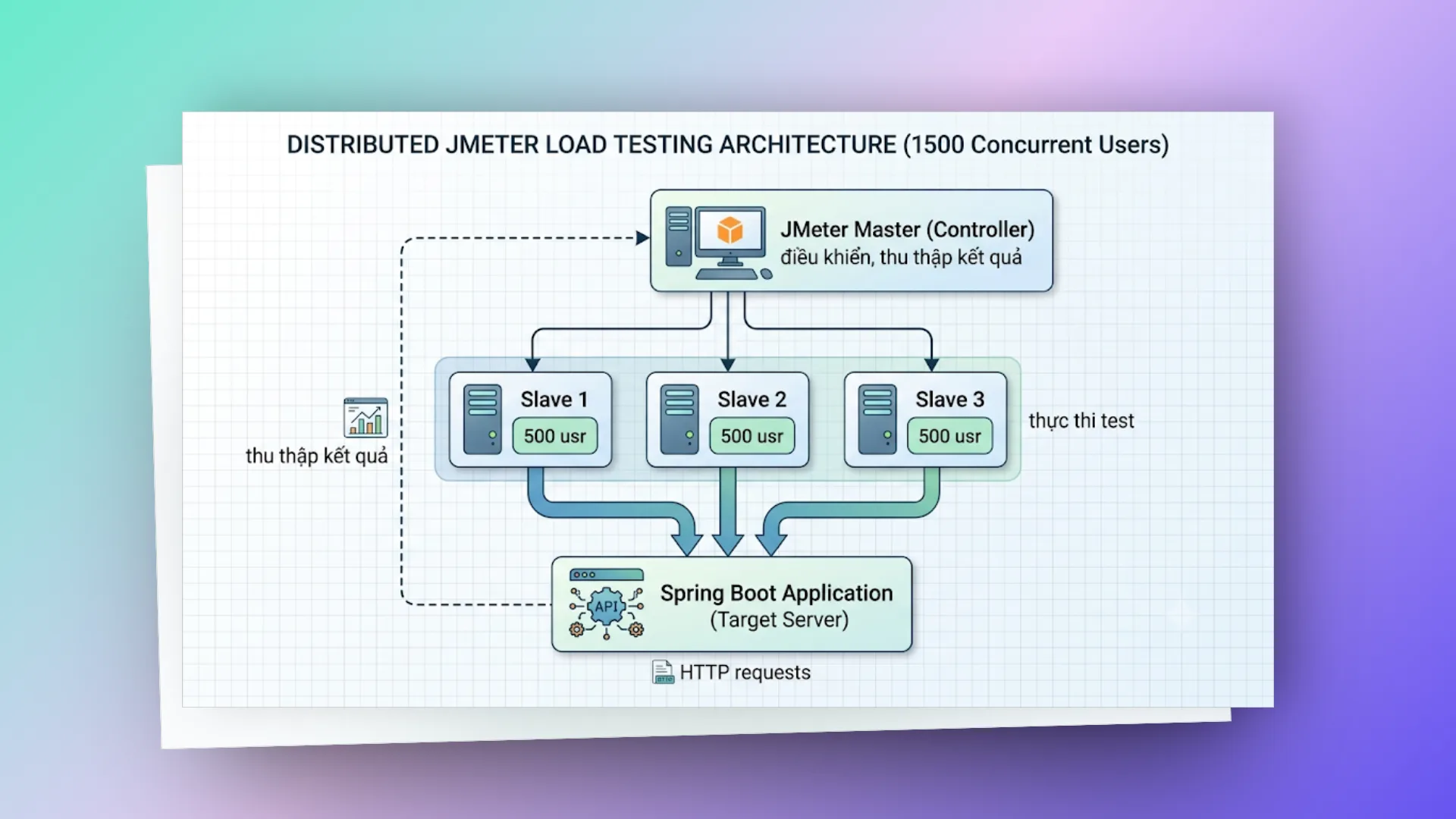
# cấu hình
# Trên mỗi Slave machine — chạy JMeter server
jmeter-server -Djava.rmi.server.hostname=192.168.1.101

# Trên Master — file jmeter.properties
remote_hosts=192.168.1.101,192.168.1.102,192.168.1.103

# Chạy distributed test từ Master
jmeter -n -t test-plan.jmx -l results.jtl -R 192.168.1.101,192.168.1.102,192.168.1.103
# lưu ý quan trọng
- Tất cả machines phải cùng version JMeter
- CSV data files phải có trên mỗi slave (hoặc dùng absolute path chung)
- Firewall phải mở port RMI (default 1099) và port range cho data transfer
- Master chỉ điều khiển, không chạy test (trừ khi thêm
localhostvào remote_hosts)
# tối ưu spring boot để chịu tải tốt hơn
Khi JMeter phát hiện bottleneck, cần tuning Spring Boot:
# connection pool (HikariCP)
# application.yml
spring:
  datasource:
    hikari:
      maximum-pool-size: 30 # Tăng theo số concurrent request
      minimum-idle: 10
      connection-timeout: 20000 # 20s
      idle-timeout: 300000 # 5 phút
      max-lifetime: 1200000 # 20 phút
      leak-detection-threshold: 60000 # Log warning nếu connection giữ > 60s
# tomcat thread pool
server:
  tomcat:
    threads:
      max: 200 # Max worker threads (default: 200)
      min-spare: 20 # Min idle threads
    max-connections: 8192
    accept-count: 100 # Queue size khi tất cả threads bận
    connection-timeout: 20000
# redis cache (giảm db hits)
@Service
@RequiredArgsConstructor
public class ProductService {

   private final ProductRepository repo;
   private final RedisTemplate<String, ProductDTO> redisTemplate;

   @Cacheable(value = "products", key = "#id", unless = "#result == null")
   public ProductDTO getById(UUID id) {
       return repo.findById(id)
           .map(this::toDTO)
           .orElseThrow(() -> new EntityNotFoundException("Product not found: " + id));
   }

   @CacheEvict(value = "products", key = "#id")
   public ProductDTO update(UUID id, UpdateProductRequest request) {
       // ... update logic
   }
}
# async processing
@Configuration
@EnableAsync
public class AsyncConfig {

   @Bean("taskExecutor")
   public Executor taskExecutor() {
       ThreadPoolTaskExecutor executor = new ThreadPoolTaskExecutor();
       executor.setCorePoolSize(10);
       executor.setMaxPoolSize(30);
       executor.setQueueCapacity(500);
       executor.setThreadNamePrefix("async-");
       executor.setRejectedExecutionHandler(new ThreadPoolExecutor.CallerRunsPolicy());
       executor.initialize();
       return executor;
   }
}

// Non-critical work (audit log, notification) chạy async
@Async("taskExecutor")
public void logActivity(ActivityEvent event) {
   activityRepository.save(event);
}
# jvm tuning
# Cho production với Spring Boot
JAVA_OPTS="-Xms2g -Xmx2g \
 -XX:+UseG1GC \
 -XX:MaxGCPauseMillis=200 \
 -XX:+UseStringDeduplication \
 -XX:+OptimizeStringConcat \
 -Djava.security.egd=file:/dev/./urandom"
# monitoring spring boot trong khi load test
# spring boot actuator + prometheus + grafana
# application.yml
management:
  endpoints:
    web:
      exposure:
        include: health,prometheus,metrics
  metrics:
    export:
      prometheus:
        enabled: true
    tags:
      application: ${spring.application.name}
# metrics cần theo dõi song song với jmeter
| Metric | Prometheus Query | Alert khi |
|---|---|---|
| HTTP request duration | http_server_requests_seconds{quantile="0.95"} | > 2s |
| Active threads | tomcat_threads_busy_threads | > 80% max |
| DB connection pool | hikaricp_connections_active | > 80% max pool |
| JVM Heap | jvm_memory_used_bytes{area="heap"} | > 80% max |
| GC pause | jvm_gc_pause_seconds_max | > 500ms |
| Error rate | http_server_requests_seconds_count{status=~"5.."} | > 1% |
| Queue depth (RabbitMQ) | rabbitmq_queue_messages | Tăng liên tục |
# kết hợp jmeter + grafana
JMeter có thể push metrics real-time lên InfluxDB → visualize trên Grafana:
# Thêm Backend Listener trong JMeter:
# Type: org.apache.jmeter.visualizers.backend.influxdb.InfluxdbBackendListenerClient
# influxdbUrl: http://influxdb:8086/write?db=jmeter
# application: csp-product-api
# measurement: jmeter
Dashboard Grafana sẽ hiển thị:
- Response time (avg, P90, P95, P99) theo thời gian
- Throughput (req/s) theo thời gian
- Error rate theo thời gian
- Active threads theo thời gian
# kịch bản test thực tế — csp api
# scenario 1: load test cho product search api
Mục tiêu: Xác nhận API search product chịu được 500 concurrent users

Thread Group:
- Threads: 500
- Ramp-up: 120s (mỗi giây thêm ~4 users)
- Duration: 600s (10 phút)

Kịch bản mỗi user:
1. Login lấy token (Once Only)
2. Loop:
  a. GET /api/v1/products?keyword=${random_keyword}&page=0&size=20
  b. Think time: 2-5s (Gaussian Random Timer)
  c. GET /api/v1/products/${random_id}
  d. Think time: 1-3s

Assertions:
- Response code = 200
- Response time < 2000ms
- Body contains "data"

Pass criteria:
- P95 response time < 1000ms
- Error rate < 1%
- Throughput > 200 req/s
# scenario 2: stress test — tìm breaking point
Mục tiêu: Tìm số users tối đa trước khi error rate > 5%

Thread Group (Stepping Thread Group plugin):
- Start threads: 50
- Add 50 threads every 30 seconds
- Max threads: 2000
- Hold load for 60s at each step

Quan sát:
- Tại bước nào error rate bắt đầu > 1%?
- Tại bước nào response time P95 > 3s?
- Tại bước nào throughput bắt đầu giảm (saturation point)?

Ví dụ kết quả:
- 50-400 users: ổn định, P95 < 500ms
- 400-600 users: P95 tăng lên 800ms-1200ms
- 600-800 users: error rate bắt đầu 2-3%, P95 = 2000ms
- > 800 users: error rate > 5% → BREAKING POINT ≈ 700-800 users
# scenario 3: soak test — phát hiện memory leak
Mục tiêu: Chạy liên tục 4 giờ, kiểm tra memory leak

Thread Group:
- Threads: 100 (moderate load)
- Ramp-up: 60s
- Duration: 14400s (4 giờ)

Quan sát theo thời gian:
- JVM Heap usage: tăng dần không giải phóng? → Memory leak
- Response time: tăng dần? → Resource exhaustion
- GC frequency: tăng? → Heap pressure
- DB connection: tăng dần? → Connection leak
- Thread count: tăng dần? → Thread leak

Red flags:
⚠️ Heap tăng liên tục qua mỗi giờ (sawtooth pattern bình thường, upward trend = leak)
⚠️ Full GC ngày càng thường xuyên
⚠️ Response time tăng 50%+ sau 2 giờ so với ban đầu
# jmeter plugins hữu ích
# cài đặt plugin manager
# Download từ https://jmeter-plugins.org/install/Install/
# Copy jmeter-plugins-manager.jar vào lib/ext/
# Restart JMeter → Menu Options → Plugins Manager
# plugins nên cài
| Plugin | Chức năng |
|---|---|
| Custom Thread Groups | Stepping Thread Group, Ultimate Thread Group (ramp pattern phức tạp) |
| 3 Basic Graphs | Response Time Over Time, Active Threads, Transactions Per Second |
| Throughput Shaping Timer | Kiểm soát chính xác throughput theo thời gian |
| JSON/YAML Plugins | Hỗ trợ JSON Path Assertion, YAML processing |
| Parallel Controller | Chạy nhiều request song song trong 1 thread |
| Inter-Thread Communication | Chia sẻ data giữa thread groups |
| InfluxDB Writer | Push metrics real-time lên InfluxDB/Grafana |
# ultimate thread group — load pattern phức tạp
Ví dụ: Mô phỏng traffic thực tế trong ngày

Row 1: Start=0,  Initial=0, Startup=60,  Hold=300, Shutdown=30  → 100 threads
Row 2: Start=120, Initial=0, Startup=60,  Hold=240, Shutdown=30  → 200 threads (peak)
Row 3: Start=360, Initial=0, Startup=30,  Hold=120, Shutdown=60  → 50 threads (off-peak)

Timeline:
0-60s:   Ramp 0→100
60-120s: Hold 100
120-180s: Ramp 100→300 (thêm 200)
180-360s: Hold 300
360-420s: 300→250→50 (giảm dần)
# scripting trong jmeter — jsr223 (groovy)
# pre-processor: generate complex request body
// JSR223 PreProcessor (Groovy)
import groovy.json.JsonOutput
import java.time.LocalDateTime
import java.time.format.DateTimeFormatter

def now = LocalDateTime.now().format(DateTimeFormatter.ISO_DATE_TIME)
def requestBody = [
   name: "Product-${UUID.randomUUID().toString().take(8)}",
   code: "PRD-${vars.get('__threadNum')}-${System.currentTimeMillis()}",
   price: new Random().nextInt(9000) + 1000,
   category: ["ELECTRONICS", "CLOTHING", "FOOD", "BOOKS"][new Random().nextInt(4)],
   metadata: [
       createdAt: now,
       source: "jmeter-load-test",
       batchId: vars.get("BATCH_ID") ?: "batch-001"
   ]
]

vars.put("requestBody", JsonOutput.toJson(requestBody))
# post-processor: extract và validate response
// JSR223 PostProcessor (Groovy)
import groovy.json.JsonSlurper

def response = new JsonSlurper().parseText(prev.getResponseDataAsString())

if (response.data?.id) {
   vars.put("created_product_id", response.data.id.toString())
   log.info("Created product: ${response.data.id}")
} else {
   log.error("Failed to create product. Response: ${prev.getResponseDataAsString()}")
   prev.setSuccessful(false)
   prev.setResponseMessage("Product creation failed - no ID returned")
}

// Lưu metrics custom
def responseTime = prev.getTime()
if (responseTime > 2000) {
   log.warn("SLOW REQUEST: ${prev.getSampleLabel()} took ${responseTime}ms")
}
# assertion: custom business logic validation
// JSR223 Assertion (Groovy)
import groovy.json.JsonSlurper

def response = new JsonSlurper().parseText(prev.getResponseDataAsString())

// Validate business rules
if (response.data?.price != null && response.data.price <= 0) {
   AssertionResult.setFailure(true)
   AssertionResult.setFailureMessage("Product price must be positive, got: ${response.data.price}")
}

if (response.data?.name?.length() > 255) {
   AssertionResult.setFailure(true)
   AssertionResult.setFailureMessage("Product name exceeds 255 chars")
}
# ci/cd integration — tự động hóa load test
# gitlab ci pipeline
# .gitlab-ci.yml
load-test:
  stage: performance
  image: justb4/jmeter:5.6.3
  variables:
    TARGET_HOST: 'api.staging.internal'
    TARGET_PORT: '443'
    THREADS: '200'
    DURATION: '300'
  script:
    - mkdir -p results
    - jmeter -n
      -t tests/load-test-plan.jmx
      -l results/results.jtl
      -e -o results/report/
      -Jhost=${TARGET_HOST}
      -Jport=${TARGET_PORT}
      -Jthreads=${THREADS}
      -Jduration=${DURATION}
    # Fail pipeline nếu error rate > 2% hoặc P95 > 2000ms
    - python3 scripts/check-results.py results/results.jtl
      --max-error-rate 2
      --max-p95 2000
  artifacts:
    paths:
      - results/report/
    when: always
  rules:
    - if: $CI_PIPELINE_SOURCE == "schedule" # Chạy theo schedule
    - if: $CI_COMMIT_BRANCH == "main"
      when: manual
# script kiểm tra kết quả tự động
# scripts/check-results.py
import csv
import sys
import argparse

def analyze_results(jtl_file, max_error_rate, max_p95):
   errors = 0
   total = 0
   response_times = []

   with open(jtl_file, 'r') as f:
       reader = csv.DictReader(f)
       for row in reader:
           total += 1
           if row['success'] == 'false':
               errors += 1
           response_times.append(int(row['elapsed']))

   error_rate = (errors / total) * 100 if total > 0 else 0
   response_times.sort()
   p95_index = int(len(response_times) * 0.95)
   p95 = response_times[p95_index] if response_times else 0

   print(f"Total requests: {total}")
   print(f"Error rate: {error_rate:.2f}%")
   print(f"P95 response time: {p95}ms")

   if error_rate > max_error_rate:
       print(f"FAIL: Error rate {error_rate:.2f}% exceeds threshold {max_error_rate}%")
       sys.exit(1)
   if p95 > max_p95:
       print(f"FAIL: P95 {p95}ms exceeds threshold {max_p95}ms")
       sys.exit(1)

   print("PASS: All thresholds met")

if __name__ == "__main__":
   parser = argparse.ArgumentParser()
   parser.add_argument("jtl_file")
   parser.add_argument("--max-error-rate", type=float, default=2.0)
   parser.add_argument("--max-p95", type=int, default=2000)
   args = parser.parse_args()
   analyze_results(args.jtl_file, args.max_error_rate, args.max_p95)
# best practices
# thiết kế test plan
- Dùng Transaction Controller nhóm related requests — đo đúng business operation time
- Thêm Think Time giữa requests (1-5s) — mô phỏng user thực, không phải DDoS
- Parameterize mọi thứ — host, port, threads, duration từ properties → dùng lại được
- Tách test data vào CSV — không hardcode trong test plan
- Disable View Results Tree khi chạy thực — tốn memory, chỉ dùng debug
# chạy test
- Luôn chạy CLI mode cho test thực tế — GUI chỉ để design
- Warm-up server trước khi đo — chạy 1-2 phút tải nhẹ trước
- Ramp-up đủ chậm — tránh thundering herd effect
- Chạy đủ lâu — tối thiểu 5-10 phút cho load test, 1-4 giờ cho soak test
- Chạy nhiều lần — 1 lần chạy không đủ tin cậy, chạy 3 lần lấy trung bình
# phân tích kết quả
- Xem P95/P99 thay vì average — average che giấu long tail latency
- Correlate với server metrics — JMeter chỉ cho client view, cần server-side monitoring
- So sánh với baseline — lưu kết quả mỗi lần, so sánh regression
- Tìm saturation point — throughput không tăng dù thêm threads = server saturated
- Kiểm tra resource — CPU, memory, disk I/O, network trên server khi test
# sai lầm thường gặp
| Sai lầm | Hậu quả | Cách đúng |
|---|---|---|
| Chạy JMeter trên cùng máy với server | Kết quả sai (cạnh tranh resource) | Tách riêng machines |
| Không có think time | Tải không thực tế, server overwhelm | Thêm 1-5s random delay |
| Test trên localhost | Bỏ qua network latency | Test trên staging environment |
| Quá nhiều Listeners | JMeter OOM, kết quả sai | Chỉ giữ Summary/Aggregate, log ra .jtl |
| Không monitor server | Chỉ biết "chậm" không biết "tại sao" | Kết hợp Prometheus + Grafana |
| Ramp-up = 0 | Tất cả threads bắn cùng lúc = spike test | Ramp-up = threads/5 ~ threads/10 |
# checklist trước khi load test
□ Test plan đã được review và debug ở GUI mode (5-10 requests)
□ Assertions đúng (status code, response body)
□ Think time hợp lý (1-5s)
□ CSV data đủ dùng cho số threads × loops
□ Token/auth mechanism hoạt động (Once Only Controller)
□ Target server là staging/performance environment (KHÔNG phải production)
□ Server monitoring đã bật (Prometheus, Grafana, APM)
□ Database đã seed đủ data thực tế
□ JMeter machine có đủ resource (RAM, CPU, network)
□ Firewall/proxy không throttle
□ Team đã thông báo (tránh ai đó nghĩ server bị attack)
□ Có baseline metrics để so sánh
□ Kết quả sẽ được lưu lại (artifacts, reports)
# lời kết
| Giai đoạn | Công cụ/Kỹ thuật |
|---|---|
| Thiết kế test | JMeter GUI + Plugins (Ultimate Thread Group) |
| Chạy test | JMeter CLI + properties parameterization |
| Monitor server | Spring Actuator + Prometheus + Grafana |
| Monitor JMeter | InfluxDB Backend Listener + Grafana |
| Phân tích | HTML Report + Aggregate Report + custom scripts |
| CI/CD | GitLab CI + Docker image + threshold check script |
| Tối ưu | HikariCP tuning, Redis cache, Async, JVM tuning |
JMeter là công cụ mạnh và linh hoạt cho load testing. Kết hợp đúng cách với Spring Boot monitoring, bạn có thể phát hiện bottleneck sớm, tối ưu performance, và đảm bảo hệ thống chịu được tải production trước khi deploy.
Chỉ là những ghi chép cá nhân với hy vọng mang lại chút giá trị. Nếu thấy hữu ích, đừng ngại chia sẻ cho bạn bè & đồng nghiệp nhé!
Happy coding 😎 👍🏻 🚀 🔥.
On this page
- # cài đặt & cấu hình
- # cài đặt jmeter
- Cấu hình JVM cho JMeter (test lớn)
- # kiến trúc jmeter — các thành phần chính
- # giải thích các thành phần
- # spring boot api mẫu để test
- # controller
- # security config (endpoint cần bearer token)
- # thiết kế test plan trong jmeter
- # test plan cơ bản — get api (không auth)
- # test plan với authentication (oauth2/jwt)
- # test plan với csv data (nhiều users khác nhau)
- # chạy jmeter — gui vs cli
- # gui mode (chỉ dùng để thiết kế & debug)
- # cli mode (non-gui — dùng cho test thực tế)
- # sử dụng properties trong test plan
- # jmeter functions hữu ích
- # đọc kết quả — các metrics quan trọng
- # aggregate report
- # phân tích kết quả
- # distributed testing — chạy jmeter phân tán
- # kiến trúc
- # cấu hình
- # lưu ý quan trọng
- # tối ưu spring boot để chịu tải tốt hơn
- # connection pool (HikariCP)
- # tomcat thread pool
- # redis cache (giảm db hits)
- # async processing
- # jvm tuning
- # monitoring spring boot trong khi load test
- # spring boot actuator + prometheus + grafana
- # metrics cần theo dõi song song với jmeter
- # kết hợp jmeter + grafana
- # kịch bản test thực tế — csp api
- # scenario 1: load test cho product search api
- # scenario 2: stress test — tìm breaking point
- # scenario 3: soak test — phát hiện memory leak
- # jmeter plugins hữu ích
- # cài đặt plugin manager
- # plugins nên cài
- # ultimate thread group — load pattern phức tạp
- # scripting trong jmeter — jsr223 (groovy)
- # pre-processor: generate complex request body
- # post-processor: extract và validate response
- # assertion: custom business logic validation
- # ci/cd integration — tự động hóa load test
- # gitlab ci pipeline
- # script kiểm tra kết quả tự động
- # best practices
- # thiết kế test plan
- # chạy test
- # phân tích kết quả
- # sai lầm thường gặp
- # checklist trước khi load test
- # lời kết